
Work today rarely feels simple. A single day can involve emails, reports, meetings, research, and unexpected problem-solving. By the afternoon, the real challenge is no longer effort-it’s mental fatigue.
This is where Claude fits in-not as a replacement for thinking, but as a tool that helps structure it. Its value isn’t dramatic or flashy. Instead, it shows up in small, consistent improvements that reduce friction across writing, planning, research, and even development tasks.
Listen Aloud!
The Real Productivity Problem: Mental Overload

Most professionals don’t lack ideas; they lack mental space.
Switching between creative writing, analytical thinking, and administrative coordination drains focus. Even small interruptions come with a cognitive cost.
Claude works best as a structured thinking partner. You provide intent and context; it helps organize, draft, and refine. The result is less time spent restarting tasks and more time moving work forward.
Writing On Black Page Causes Stress
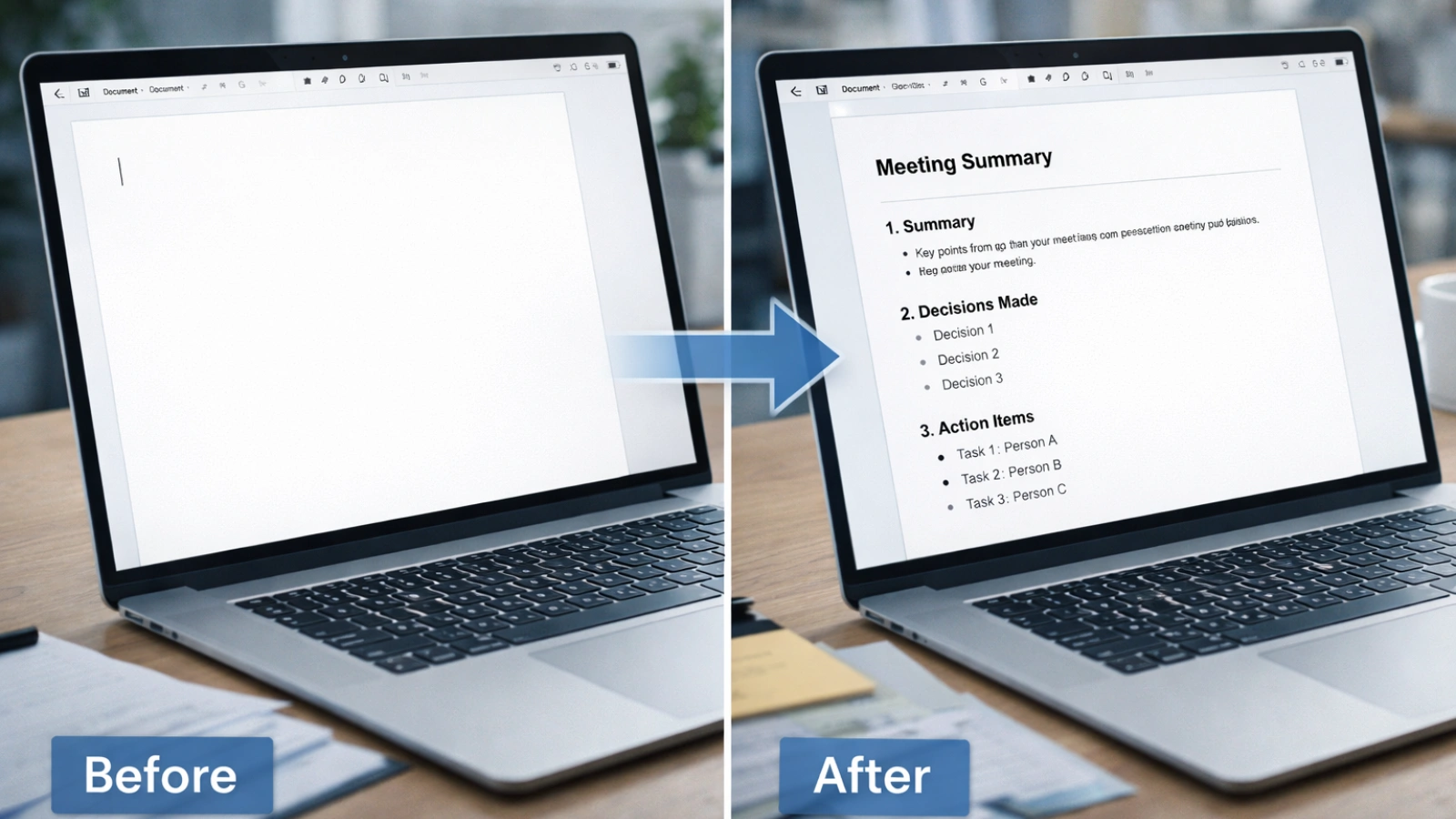
Starting is often the hardest part.
Whether it’s a proposal or a performance review, a blank page creates unnecessary friction. Claude reduces that by generating structured outlines before you begin. Instead of forcing ideas into shape, you start with a framework.
For example, after a meeting, you can turn scattered notes into:
- A concise summary
- Key decisions
- Clear action items
- Assigned responsibilities
You still review and refine, but the heavy lifting is already done. Over time, this leads to:
- More polished reports
- Clearer emails
- Consistent internal documentation
And most importantly, less time rewriting sentences that don’t feel right.
Improving Everyday Communication
Communication challenges usually stem from unclear phrasing rather than weak ideas.
You might draft an email that feels too blunt or too vague. Instead of rewriting repeatedly, you can request a more diplomatic or concise version.
This is particularly useful when translating technical concepts for non-technical teams or summarizing a strategy for leadership. Claude helps refine clarity without changing your intent.
The improvement is subtle, but clarity compounds.
Making Research Less Overwhelming
Research can quickly become overwhelming. A simple question turns into multiple tabs, scattered notes, and half-read documents.
Claude supports research by helping you organize information once you gather it. You can paste notes or summaries and request a structured breakdown.
For instance:
- Compare two platforms based on features and cost
- Summarize regulatory updates into key implications
- Extract themes from multiple reports
Instead of juggling fragments, you see organized insight. This is not a substitute for deep research. It is a way to make sense of what you have already collected. And when deadlines are tight, that clarity matters.
Turning Ideas Into Action Plans
Many projects stall because they lack structure. Big goals feel overwhelming until broken into steps. Claude can convert high-level objectives into phased plans. If you are launching a new service, you might request:
- A 60-day roadmap
- Milestones and checkpoints
- Risk considerations
- Resource suggestions
The result is not perfect. It is a starting structure you can refine. This approach works equally well for personal goals. Planning a certification exam? Ask for a weekly study plan. Preparing for a product launch? Request a timeline draft.
Instead of guessing where to begin, you begin with direction.
What Is Claude Code?

If you’re wondering what is Claude code, it refers to AI-assisted development capabilities designed to support programmers with structured, context-aware help.
Unlike simple autocomplete tools, Claude code can:
- Analyze larger code sections
- Suggest improvements
- Explain logic clearly
- Help with documentation and reviews
It doesn’t replace developers; it enhances their efficiency.
How to Use Claude Code Effectively
Understanding how to use Claude code well is less about technical setup and more about clarity.
Be Specific With Goals
Instead of writing “improve this,” specify what improvement means. Are you optimizing performance? Reducing duplication? Strengthening validation?
Clear intent produces clearer results.
Provide Context
AI performs best when it understands the environment. Share relevant files or describe system architecture when possible.
Request Structured Output
Ask for:
- Identified issues
- Suggested changes
- Revised code
- Reasoning behind each change
Structured responses make validation easier.
Test Everything
AI suggestions must be tested. Always treat outputs as drafts requiring review. When used carefully, AI coding reduces repetitive debugging and documentation tasks while preserving control.
Security Still Comes First

Whenever AI interacts with technical systems, security questions follow. That is why Claude code security is a serious topic. Responsible usage includes:
- Limiting access permissions
- Operating within sandboxed environments
- Logging interactions
- Reviewing changes before implementation
Teams should define clear policies around AI use. Transparency builds trust internally.
For individuals, simple precautions help. Avoid sharing confidential credentials in prompts. Keep sensitive data secure. Productivity gains should never compromise integrity.
Everyday Wins That Add Up
The impact of AI often feels small at the moment. But over weeks, the time saved becomes significant.
Here are realistic daily improvements:
Faster Email Turnaround
Draft once. Refine tone quickly. Send confidently.
Cleaner Meeting Summaries
Transform messy notes into structured minutes within minutes.
Simplified Documentation
Turn complex explanations into readable guides for clients or colleagues.
Reduced Brainstorming Friction
When ideas feel stuck, request alternative approaches. You might not use them directly, but they spark momentum.
Less Repetitive Editing
Instead of manually polishing every paragraph, refine strategically. These are not dramatic transformations. They are steady improvements that reduce fatigue.
Comparing Popular AI Productivity Tools
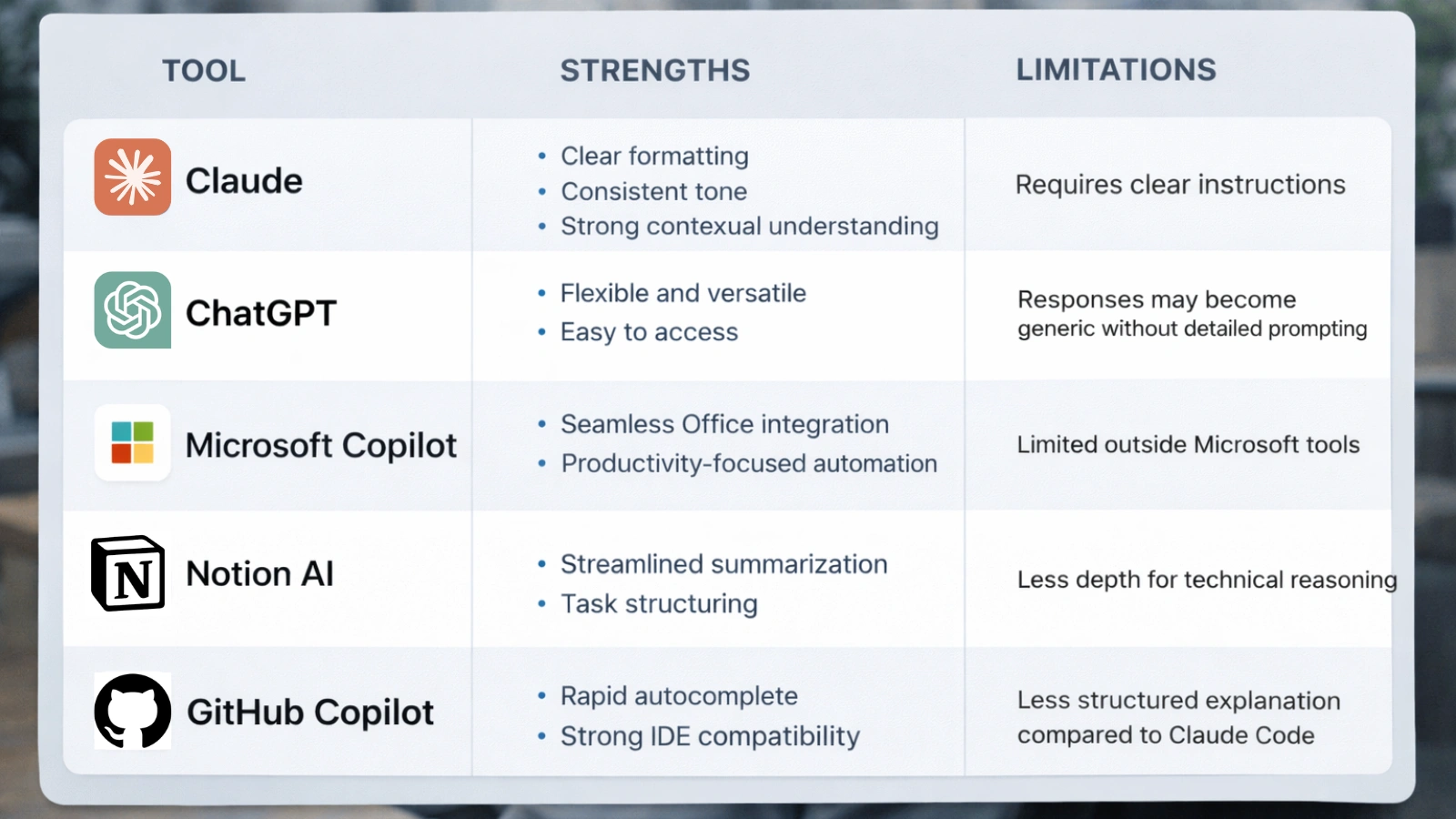
AI options continue to expand. Each serves a slightly different purpose.
1. Claude
It is known for structured reasoning and thoughtful long-form responses. Also, this platform handles layered prompts well and excels at drafting organized content.
Strengths:
- Clear formatting
- Consistent tone
- Strong contextual understanding
Limitations:
- Requires clear instructions
2. ChatGPT
A widely used conversational AI suited for general drafting and idea generation.
Strengths:
- Flexible and versatile
- Easy to access
Limitations:
- Responses may become generic without detailed prompting
3. Microsoft Copilot
Embedded within Microsoft applications, enhancing documents and spreadsheets.
Strengths:
- Seamless Office integration
- Productivity-focused automation
Limitations:
- Limited outside Microsoft tools
4. Notion AI
Built for note organization and workflow support within Notion.
Strengths:
- Streamlined summarization
- Task structuring
Limitations:
- Less depth for technical reasoning
5. GitHub Copilot
Designed for inline coding assistance.
Strengths:
- Rapid autocomplete
- Strong IDE compatibility
Limitations:
- Less structured explanation compared to Claude code
The best choice depends on your daily workload. If structured thinking and reasoning depth matter most, Claude often stands out.
A Thoughtful Approach to Integration

Adopting AI should feel natural, not disruptive.
Some technology firms, including GlobussoftAI, focus on helping businesses integrate AI systems in ways that align with governance and compliance standards. Their emphasis tends to be on customization and responsible deployment rather than rapid experimentation. This balanced approach helps organizations benefit from innovation without creating operational risk.
Also Read!
What Is OpenClaw Gemini? Everything You Need To Know
How To Use Openclaw: From Zero To Ai Automation In 30 Minutes – Globussoft AI
Avoiding Overreliance
AI is a tool, not a decision-maker. It can speed up tasks, but you remain responsible for the final outcome. Always review outputs carefully, verify important facts, and test any technical suggestions, especially when using Claude code.
At the same time, avoid sharing sensitive information to maintain Claude code security. Think of AI as a collaborator that supports your thinking, not replaces it, ensuring you stay in control while working more efficiently.
The Long-Term Impact on Your Workday

Over months, small efficiencies accumulate. Saving ten minutes on drafting, fifteen minutes on summarizing, and another ten on planning can reclaim hours each week. Users often notice:
- Clearer thinking
- Less stress around deadlines
- Faster document turnaround
- More energy for strategic tasks
This AI platform becomes part of your routine quietly. You open it when stuck, refine drafts faster, and move forward sooner. The improvement feels incremental at first. Then it feels essential.
FAQ
Can Claude help outside business tasks?
Yes. Study planning, personal organization, and structured writing benefit from the same approach.
Is Claude code difficult to learn?
No. It requires thoughtful prompting but not a complex setup for basic use.
How does Claude code security protect projects?
Security depends on governance policies, controlled access, and review practices rather than automation alone.
Will AI tools replace human decision-making?
No. They support drafting and organization but do not replace accountability or expertise.
What is the biggest daily benefit?
Reduced mental friction. Tasks start faster, structure appears sooner, and clarity improves.