What if your AI assistant didn’t live inside a browser tab…
but inside your actual life?
Imagine texting your assistant on WhatsApp while driving, continuing the same conversation on your laptop dashboard, and having it quietly manage your calendar, files, reminders, and research in the background.
That’s the promise of OpenClaw.
In this complete 2026 guide, you’ll learn:
- What OpenClaw Really Is, and How It Differs from ChatGPT
- How to install and configure it step-by-step
- How to connect WhatsApp, Telegram, and more
- How to run it securely (without creating a digital security nightmare)
- Real-world use cases that replace multiple SaaS tools
- How to turn it into a true “superagent”
If you’re looking for a serious OpenClaw tutorial, this is the one.
In a hurry? Listen to the blog instead!
What Is OpenClaw (And Why Everyone’s Talking About It)?
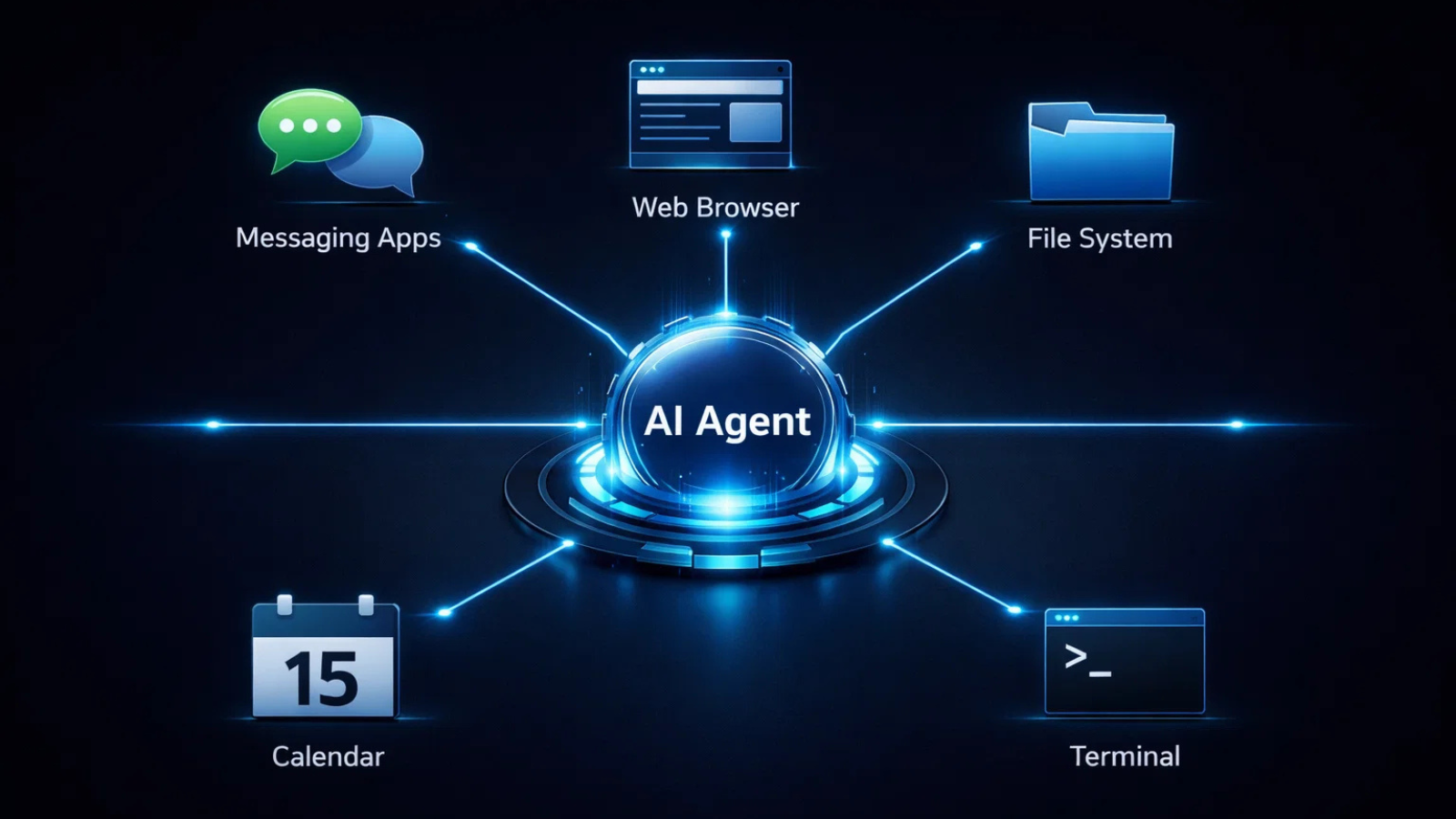
OpenClaw is a self-hosted AI agent gateway that connects your messaging apps (WhatsApp, Telegram, Discord, iMessage, and more) to an AI agent running on your own machine or VPS.
Instead of:
- Going to ChatGPT for one task
- Gemini for another
- Copilot for something else
You bring them to you.
OpenClaw acts as the central bridge between:
- Your chat apps
- Your AI model (Claude, GPT, etc.)
- Your tools (browser, calendar, files, shell)
- Your persistent memory
It’s not just a chatbot. It’s an AI agent that can actually execute tasks.
OpenClaw vs Traditional AI Chatbots
Let’s clarify something important.
When you ask a normal chatbot to:
“Organize my desktop files”
It gives you suggestions.
When you ask OpenClaw:
“Organize my desktop files”
It actually renames, sorts, and moves them.
That’s the difference between:
- 💬 Conversational AI
- 🤖 Action-based AI agents
This is why OpenClaw for beginners feels overwhelming at first – because it’s powerful.
But once you understand the structure, it becomes incredibly logical.
Core Features That Make OpenClaw Powerful
Here’s what makes OpenClaw stand out in 2026:
1️⃣ Multi-Channel Messaging Gateway
One gateway process can serve:
- Telegram
- Discord
- iMessage
- Slack (via plugins)
- And more
You message your assistant from wherever you already are.
No new app.
No switching tools.
Zero friction.
2️⃣ System-Level Execution
<p>You can authorize it to:
- Run shell commands
- Control a browser (headless Chromium)
- Manage local files
- Monitor your inbox
- Update your calendar
- Transcribe voice notes
This is what upgrades it from “AI tool” to “digital operator.”
3️⃣ Persistent Memory
Unlike stateless chatbots, OpenClaw remembers:
- Your habits
- Your projects
- Your preferences
- Your workflows
Over time, it becomes a digital twin.
4️⃣ Self-Hosted = Full Control & OpenClaw Security
OpenClaw is designed with privacy and control in mind, making OpenClaw security an important consideration when setting up your agent.
You can run OpenClaw on:
Your laptop
A home server
Or a $5/month VPS
Because it is self-hosted, your data is not automatically sent to external servers. However, proper configuration is essential — including gateway access restriction, token management, and tool permission control.
No cloud lock-in.
No forced subscription.
Your data stays under your control.
How to Use OpenClaw: Step-by-Step Installation

Now let’s get practical.
Here’s how to use and install OpenClaw from scratch.
Step 1: Prerequisites
You’ll need:
- Node.js v22+
- macOS, Linux, or Windows (WSL recommended)
- An API key (Anthropic or OpenAI)
Check Node:
node –version
Step 2: Install OpenClaw
Option 1: Quick Install (Recommended)
curl -fsSL https://OpenClaw.ai/install.sh | bash
Or via npm:
npm install -g OpenClaw@latest
Step 3: Run the Onboarding Wizard
OpenClaw onboard –install-daemon
This wizard configures:
- Model provider
- Gateway port
- Authentication token
- Messaging channels
- Workspace
- Daemon service
The default gateway runs on:
http://127.0.0.1:18789
Open dashboard:
OpenClaw dashboard
If it loads — you’re live.
That’s the fastest way to complete your first OpenClaw tutorial cycle.
Connecting Messaging Channels
After onboarding:
OpenClaw channels login
You can pair:
- Telegram
- Discord
- Others via plugins
Once paired, your assistant lives inside your messages.
This is where things start to feel futuristic.
Advanced Setup: Running OpenClaw on a VPS
If you want a 24/7 personal assistant, run OpenClaw on a VPS.
Typical setup:
- Hostinger VPS (2 vCPU, 8GB RAM)
- Docker container
- Headless Chromium
- SSH tunnel
- API keys via .env
- Tello eSIM for agent phone number
This allows your agent to:
- Send/receive WhatsApp messages
- Call and text
- Browse the web
- Handle scheduling
- Push Git commits automatically
At that point, it stops being a toy.
It becomes infrastructure.
For individual builders, setting up OpenClaw is manageable. But for businesses deploying AI agents across departments, things quickly become more complex, from architecture planning and tool integrations to reliability, monitoring, and cost optimization.
This is where structured AI engineering support from experienced partners like Globussoft AI becomes valuable, especially when moving from experimentation to production-ready systems.
How Globussoft AI Enables Scalable, Adaptive AI Solutions

While OpenClaw provides a powerful open-source automation backbone, deploying AI agents at scale requires more than installation. Businesses need reliability, integration, optimization, and long-term scalability.
This is where Globussoft AI plays a strategic role.
Globussoft AI helps organizations move beyond experimentation by designing and deploying production-ready AI systems that perform consistently in real-world business environments.
In simple terms:
- OpenClaw provides the automation engine.
- Globussoft AI helps transform it into a scalable business system.
Key Capabilities That Accelerate OpenClaw Deployments
AI Agent Development
Design and deploy intelligent AI agents that streamline customer support and internal operations. These agents reduce manual workload, minimize errors, and deliver faster, more personalized interactions.
LLM & Knowledge Base – Powered Chatbots
Build context-aware chatbots that combine large language models with internal knowledge bases to deliver accurate, domain-specific responses across customer and employee touchpoints.
LLM Testing & Fine-Tuning
Optimize model performance, reduce hallucinations, and improve response reliability through structured evaluation, benchmarking, and fine-tuning workflows.
AI/ML Pipeline Replication
Standardize and replicate successful AI workflows across departments to ensure consistent automation at scale.
AI/ML Consulting
Get architectural guidance on model selection, infrastructure design, cost optimization, and long-term AI adoption strategy.
AI/ML Integration
Integrate OpenClaw agents with existing CRMs, databases, enterprise systems, and communication platforms to ensure seamless workflow alignment.
For teams looking to move faster, without costly trial-and-error cycles – structured AI engineering support can dramatically shorten the path from prototype to operational impact.
The Markdown Workspace System (Why It Beats SaaS Tools)
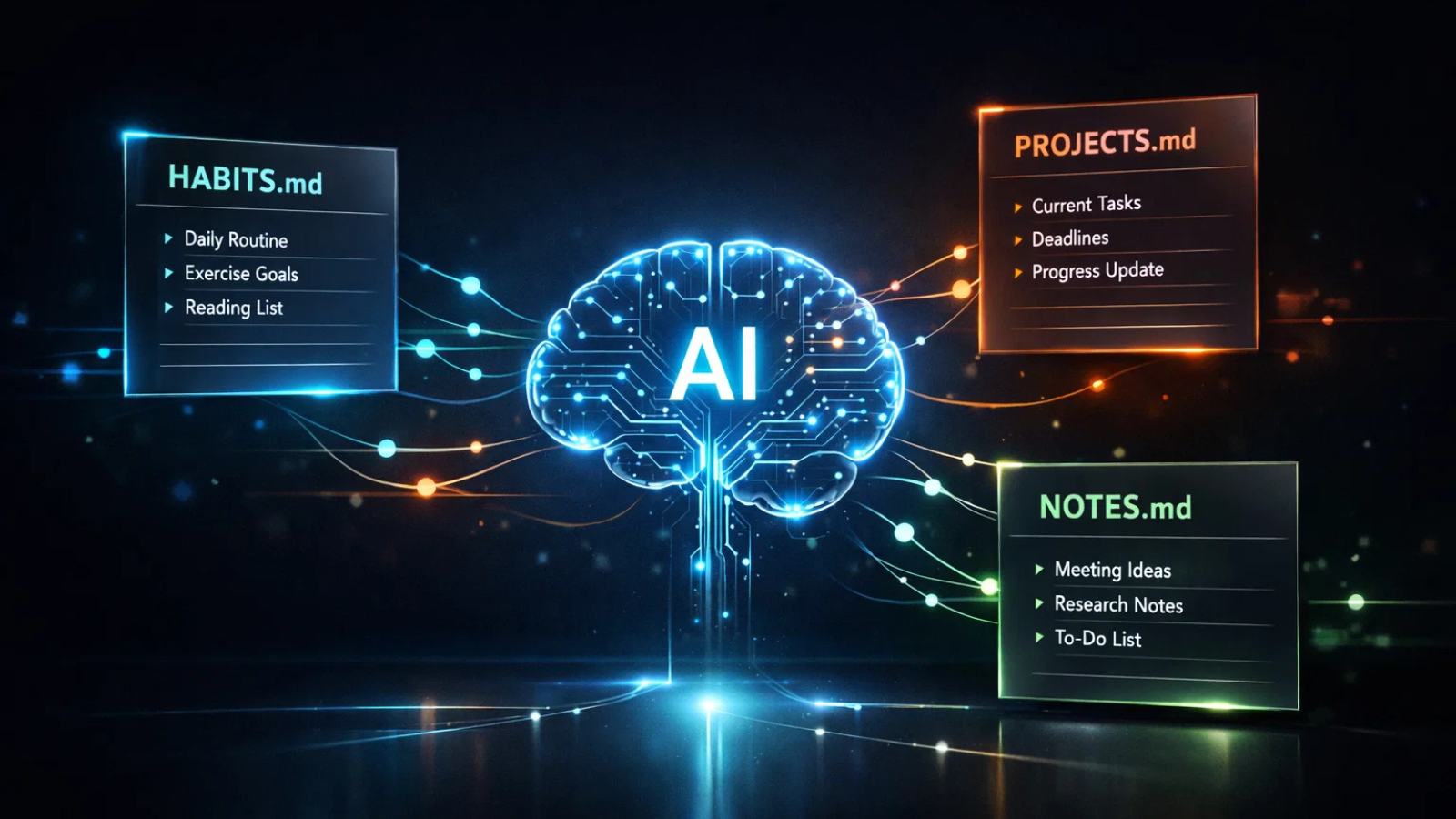
One of the most powerful patterns in advanced OpenClaw setups is ditching SaaS note apps.
Instead of:
- Notion
- Todoist
- Habit tracker apps
You use markdown files like:
HABITS.md
PROJECTS.md
NOTES.md
PROFILE.md
MEMORY.md
Every change:
- Gets committed to GitHub
- Is version-controlled
- Is tool-agnostic
Your agent reads and writes directly to these files.
When you say:
“Log gym 45 minutes”
It:
- Updates HABITS.md
- Increments streak
- Commits the change
- Pushes to repo
No API integration.
No vendor lock-in.
This is where OpenClaw for beginners evolves into something serious.
Security: The Part Nobody Talks About
Running a personal AI agent is powerful.
It is also dangerous if you’re careless.
Here’s what you MUST do.
1️⃣ Never Expose Gateway to Internet
Bind to localhost only:
ports:
– “127.0.0.1:18789:18789”
Use SSH tunneling:
ssh -L 18789:127.0.0.1:18789 user@your-vps
If someone accesses your gateway:
They control your calendar, files, and email.
2️⃣ Rotate Gateway Tokens
Treat the auth token like a password.
- Use strong random strings
- Store in .env
- Rotate periodically
3️⃣ Fix Chromium Docker Crashes
When running browser inside Docker:
shm_size: ‘2gb’
volumes:
– /dev/shm:/dev/shm
Without this, Chrome silently crashes.
4️⃣ Guard Your Config
OpenClaw sometimes rewrites config files during restarts or wizard runs.
Advanced users use:
- A “golden config” backup
- Cron-based config watcher
- Auto-restore scripts
If you skip this and run multi-agent routing?
You risk broken bindings or lost allowlists.
Security is non-negotiable.
Go Deeper into OpenClaw
OpenClaw Security Audit: Is Your AI Agent Enterprise-Ready?
OpenClaw Installation: How I Got It Running on 10 Different Devices
Three Deployment Tiers Explained
Tier 1: Personal Local Agent
- Sandbox mode
- No sudo
- No public exposure
Perfect for beginners learning how to use OpenClaw safely.
Tier 2: Multi-Agent Family Setup
- WhatsApp allowlist
- Separate agents per user
- Strict tool isolation
Here mistakes have bigger blast radius.
Tier 3: Public-Facing Assistant
- Agent with its own phone number
- Booking calls
- Making reservations
- Handling customer interactions
Treat this agent like a stranger with limited permissions.
Never link personal email or calendar.
Real-World Use Cases
Let’s move from theory to practice.
Scenario 1: Voice Notes to Action
You send a 30-second voice note while driving.
The agent:
- Transcribes it
- Extracts tasks
- Updates PROJECTS.md
- Schedules reminder
No typing required.
Scenario 2: Proactive Email Monitoring
Heartbeat feature:
- Scans inbox every 10 minutes
- Flags urgent emails
- Prepares response draft
- Suggests time slots
It becomes proactive.
Scenario 3: Developer Automation
Ask:
“Check for PRs older than 7 days.”
It:
- Queries repo
- Lists stale PRs
- Sets reminder to follow up
This is why developers love OpenClaw.
API Costs: What Should You Expect?
OpenClaw itself is free.
Your cost depends on:
- Model usage
- Token volume
- Frequency of automation
Light personal usage:
Very low.
Heavy browsing + automation:
Moderate.
You control the throttle.
Can You Use Local Models?
Yes, but:
- Requires more setup
- Hardware-dependent
- Less capable than top hosted models (as of 2026)
Most users combine:
- Anthropic (primary)
- OpenAI (fallback)
- Gemini (optional)
Who Is OpenClaw For?
Developers — Benefit from shell-level automation and Git workflow integration.
Productivity enthusiasts — Replace multiple SaaS tools by consolidating workflows into one agent system.
Privacy advocates — Keep full control over data by running everything locally or on your own infrastructure.
Remote workers — Manage conversations across multiple messaging channels without switching apps.
AI experimenters — Customize agents, workflows, and tools according to personal or business needs.
If you want something ready-made and easy to start with, OpenClaw may require some setup.
But if you want control, flexibility, and true automation power, it delivers far more.
Final Thoughts: The Superagent Shift
The future of AI isn’t more chat windows.
It’s infrastructure.
OpenClaw represents the shift from:
“AI that talks”
to
“AI that does.”
Once you understand how to use OpenClaw properly:
- It handles habits
- Manages projects
- Routes messages
- Transcribes voice
- Monitors inbox
- Books appointments
- Executes shell commands
All from a single gateway you control.
That’s not a chatbot.
That’s a superagent.
Key Takeaways
- OpenClaw is a self-hosted AI gateway connecting messaging apps to action-based agents.
- It executes real tasks — not just conversations.
- Setup is simple with the onboarding wizard.
- Security hardening is essential.
- Markdown + Git workflow replaces multiple SaaS apps.
- It scales from personal assistant to outward-facing agent.
If you’re serious about building your own AI infrastructure in 2026, learning how to use OpenClaw isn’t optional.
It’s foundational.
And now, you know exactly where to start.
Frequently Asked Questions (FAQ)
1. Is OpenClaw better than ChatGPT?
Not exactly, it serves a different purpose.
ChatGPT focuses on conversation.
OpenClaw connects AI models to your tools, files, browser, and messaging apps to execute real actions.
If you want discussion, use ChatGPT.
If you want automation, OpenClaw goes further.
2. Is OpenClaw safe?
Yes, when configured properly.
Because it’s self-hosted, you control data and permissions. Security best practices include:
- Binding the gateway to localhost
- Rotating authentication tokens
- Limiting tool access
Configured correctly, it can be highly secure.
3. Can businesses use OpenClaw for operations?
Yes.
OpenClaw can automate customer support, inbox workflows, CRM updates, scheduling, and internal task routing.
For production environments, proper architecture and monitoring matter. Many companies combine OpenClaw with structured AI engineering support to ensure scalability and reliability in real-world deployments.
4. Does OpenClaw require coding skills?
Basic technical familiarity helps, especially with CLI commands, APIs, or VPS setup.
However, the onboarding wizard simplifies installation, making it accessible for motivated beginners.
5. How much does OpenClaw cost?
OpenClaw is free and open-source.
Your costs come from:
- Model API usage
- VPS hosting (if running 24/7)
Light use is inexpensive. Heavy automation increases usage accordingly.
6. Can OpenClaw scale for enterprise use?
Yes, but scaling requires infrastructure planning, monitoring, and cost management.
While developers can self-host independently, businesses often accelerate deployment with AI engineering partners like Globussoft AI, who help convert experimental agent setups into secure, production-ready systems.
7. Is OpenClaw beginner-friendly?
It has a learning curve, but beginners can start locally in under an hour.
Advanced multi-agent or public deployments require more technical experience.