
Automation is transforming how teams communicate and manage daily tasks. Messaging platforms are no longer limited to conversations. They are now used for approvals, alerts, integrations, and workflow management. One solution that helps make this possible is OpenClaw Telegram.
By connecting Telegram with automated systems, teams can handle requests, receive notifications, and approve actions directly inside chats. Instead of switching between multiple tools, everything can be managed in one place.
In this guide, we will explore how OpenClaw Telegram works, how to configure it properly, and how it can help you automate workflows efficiently.
You can also listen to this Blog here.
What Is OpenClaw Telegram?
OpenClaw Telegram is a solution that connects Telegram to automation workflows. It allows businesses and teams to trigger actions, send notifications, and manage approvals directly from Telegram.
Rather than relying on manual communication, this system allows processes to move forward automatically based on triggers and responses.
For example, a task might require approval before moving to the next stage. Instead of logging into a dashboard, the responsible person can approve the request directly in Telegram.
This type of automation helps reduce delays and simplifies collaboration across teams.
Why Telegram Automation Is Growing
Messaging apps have become central to communication for businesses and communities. Telegram, in particular, offers powerful APIs that allow developers to create bots and automation workflows.
This is why tools like OpenClaw Telegram are becoming increasingly popular.
Some of the main benefits include:
Faster Notifications
Important updates are delivered instantly through Telegram messages.
Reduced Manual Work
Automation handles repetitive communication tasks that would otherwise require manual input.
Easy Team Collaboration
Approvals and updates happen directly inside chats, reducing the need for additional platforms.
Flexible Integrations
Through different integrations, Telegram can connect with workflow tools, monitoring systems, and productivity software.
These benefits allow teams to move faster and stay organized.
Key Features That Enable Workflow Automation
Automation tools rely on several important features to make workflows efficient. The platform provides multiple capabilities that help teams manage operations smoothly.
Telegram Bot Automation
A key component is the OpenClaw Telegram bot, which performs automated actions and communicates with users inside Telegram.
Bots can:
- Send automated alerts
- Notify teams when tasks change
- Request approvals
- Trigger workflow updates
With the OpenClaw Telegram bot, teams can automate communication and avoid manual notifications.
Pairing Approvals Through Telegram
Many workflows require approval before moving forward. This is where OpenClaw pairing with Telegram becomes useful.
With this feature, approval requests are sent directly to Telegram chats. Users can quickly review the request and approve or reject it without leaving the conversation.
The OpenClaw pairing approval telegram system helps streamline processes like:
- Task approvals
- Access permissions
- Workflow confirmations
- Internal requests
This reduces delays and makes decision-making faster.
Real-Time Alerts and Updates
Automation systems are most effective when updates are delivered instantly. With OpenClaw Telegram, notifications can be triggered whenever an event occurs.
Examples include:
- Task creation alerts
- Status change notifications
- Workflow updates
- System monitoring messages
Receiving alerts directly in Telegram helps teams stay informed without constantly checking dashboards.
How Workflow Automation Works
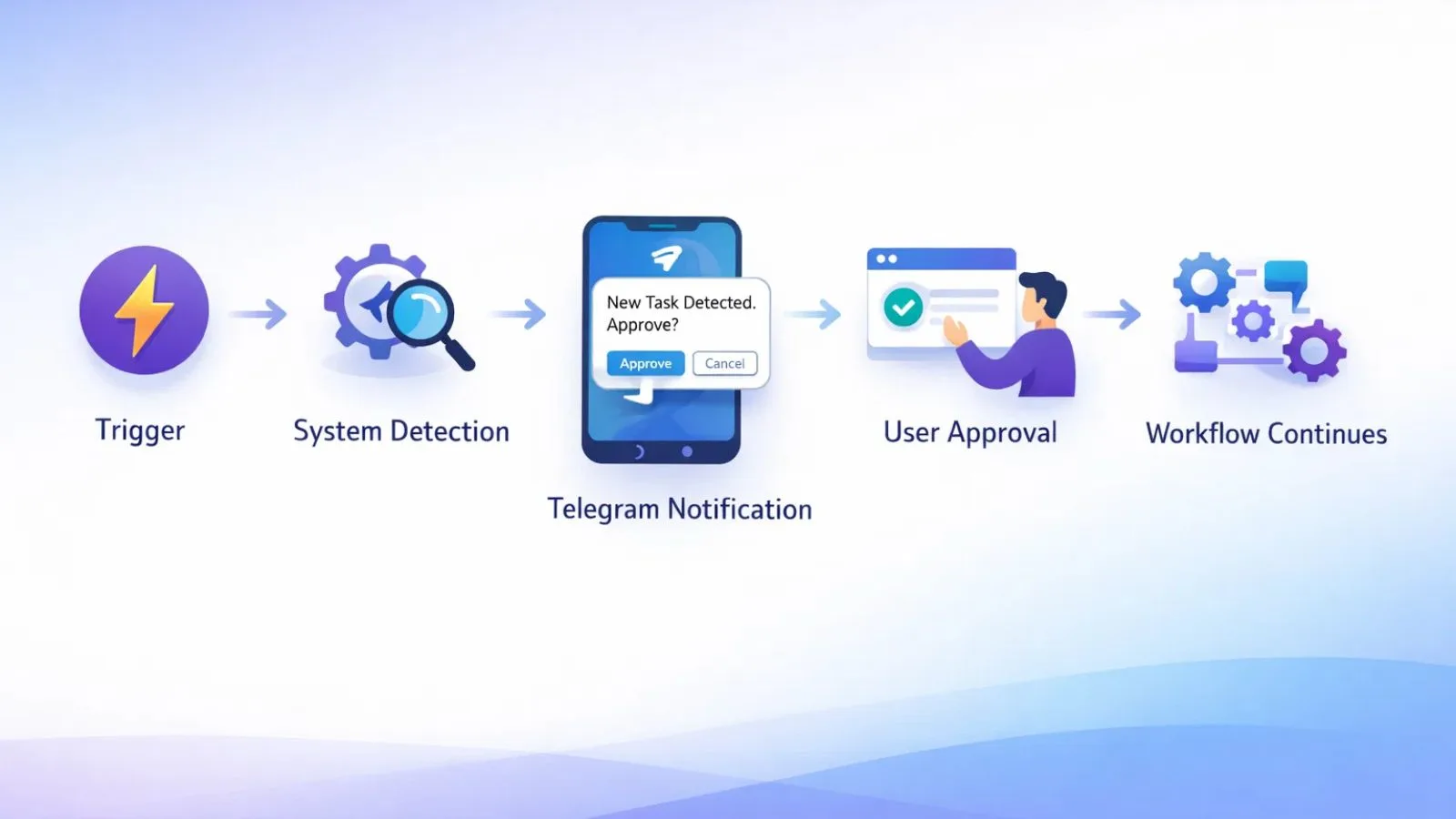
How Workflow Automation Works
Automation systems typically follow a simple process. When using OpenClaw telegram, workflows operate through triggers and responses.
The process usually looks like this:
- A trigger event occurs (such as a new task or update).
- The automation system detects the trigger.
- A message or request is sent through Telegram.
- A user responds or approves the action.
- The workflow continues automatically.
This approach removes unnecessary steps and keeps processes moving smoothly.
For organizations that manage multiple workflows daily, automation can significantly improve productivity.
Step-by-Step OpenClaw Telegram Setup
Configuring automation requires a few initial steps. The OpenClaw setup process helps ensure everything works correctly.
Step 1: Create or Connect a Telegram Bot
Start by creating a bot in Telegram. The bot will act as the communication bridge between the automation system and Telegram users.
Step 2: Define Automation Triggers
Triggers determine when actions occur. These triggers could include events like:
- Task creation
- Status updates
- System alerts
- Approval requests
Once triggers are configured, automated messages will be sent to Telegram chats.
Step 3: Enable Approval Workflows
To allow decisions inside Telegram, approval workflows must be configured.
This allows requests to appear directly in chats where users can approve or reject them quickly.
Step 4: Connect External Platforms
To expand functionality, many teams enable OpenClaw telegram integration with other tools.
This allows Telegram to receive updates from platforms such as:
- project management tools
- monitoring systems
- workflow automation platforms
- internal dashboards
Through OpenClaw telegram integration, Telegram becomes a central hub for notifications and approvals.
Step 5: Test the Automation
Before launching automation fully, it is important to test the configuration.
The OpenClaw telegram setup should be tested to confirm that:
- Notifications are delivered correctly
- Approval messages function properly
- workflow triggers behave as expected
Testing ensures that automation runs smoothly once deployed.
Using GlobussoftAi for Smarter Automation
Building and managing automation systems can sometimes become complicated, especially when multiple integrations are involved. This is where GlobussoftAi helps businesses streamline the process.
GlobussoftAi focuses on creating intelligent automation solutions that simplify communication and workflow management.
With the right setup, businesses can:
- automate repetitive communication tasks
- manage approvals efficiently
- integrate messaging platforms with operational tools
- improve workflow productivity
By combining advanced automation tools with messaging platforms, solutions like OpenClaw telegram become much easier to manage.
Organizations that adopt automation strategies supported by GlobussoftAi often experience faster processes and improved team efficiency.
Best Practices for Telegram Workflow Automation
To get the most out of OpenClaw Telegram, it helps to follow a few practical guidelines.
Start With Simple Workflows
Begin with basic automation, such as notifications or approvals, then expand gradually.
Keep Messages Clear
Automated alerts and approval requests should be short and easy to understand.
Monitor Automation Performance
Regularly review workflows to ensure triggers and responses are functioning properly.
Secure Bot Permissions
Only allow trusted users to access automation bots and approval workflows.
These practices help maintain reliable and secure automation systems.
The Future of Messaging-Based Automation
Messaging platforms are evolving rapidly. Instead of being limited to communication, they are becoming powerful productivity tools.
Solutions like OpenClaw Telegram show how messaging apps can handle tasks, approvals, and system alerts in real time.
As automation continues to improve, integrations and bots will likely become even more advanced. Businesses that adopt messaging-based automation early can benefit from faster communication, improved collaboration, and streamlined workflows.
Also Read,
OpenClaw For Enterprise: How We Deployed It For 500 Employees
Install Openclaw In 5 Minutes (Seriously): The Fastest Setup Guide
Conclusion
Automation is becoming essential for modern teams, especially those managing multiple tasks and systems daily. Messaging platforms like Telegram offer a convenient way to handle notifications, approvals, and workflow updates.
With OpenClaw Telegram, teams can automate processes, receive real-time alerts, and interact with workflows directly inside Telegram chats.
When combined with automation solutions from GlobussoftAi, organizations can create smarter systems that reduce manual work and improve productivity. As more businesses adopt automation, tools like this will continue to play an important role in efficient workflow management.
FAQs
1. What is OpenClaw Telegram used for?
OpenClaw telegram is used to automate workflows, approvals, and notifications through Telegram by connecting messaging with automation systems.
2. What does the OpenClaw Telegram bot do?
The OpenClaw Telegram bot sends alerts, manages approvals, and triggers automated actions within Telegram chats.
3. How does pairing approval work?
The OpenClaw pairing approve Telegram feature allows users to approve or reject workflow requests directly from Telegram messages.
4. Is Telegram integration difficult to configure?
With proper configuration and OpenClaw telegram integration, Telegram can easily connect with other platforms and automation tools.