AI agents are only as powerful as what they can actually do. And right now, OpenClaw skill is the fastest way to expand that power, without writing thousands of lines of custom code.
Whether you are a startup founder, a business owner, or someone just beginning to explore AI automation, this guide will teach you everything you need to know about OpenClaw skills, how they work, what they can do, and how to choose the right ones for your needs.
Let’s get into it.
In a hurry? Listen to the blog instead!
What Is an OpenClaw Skill?
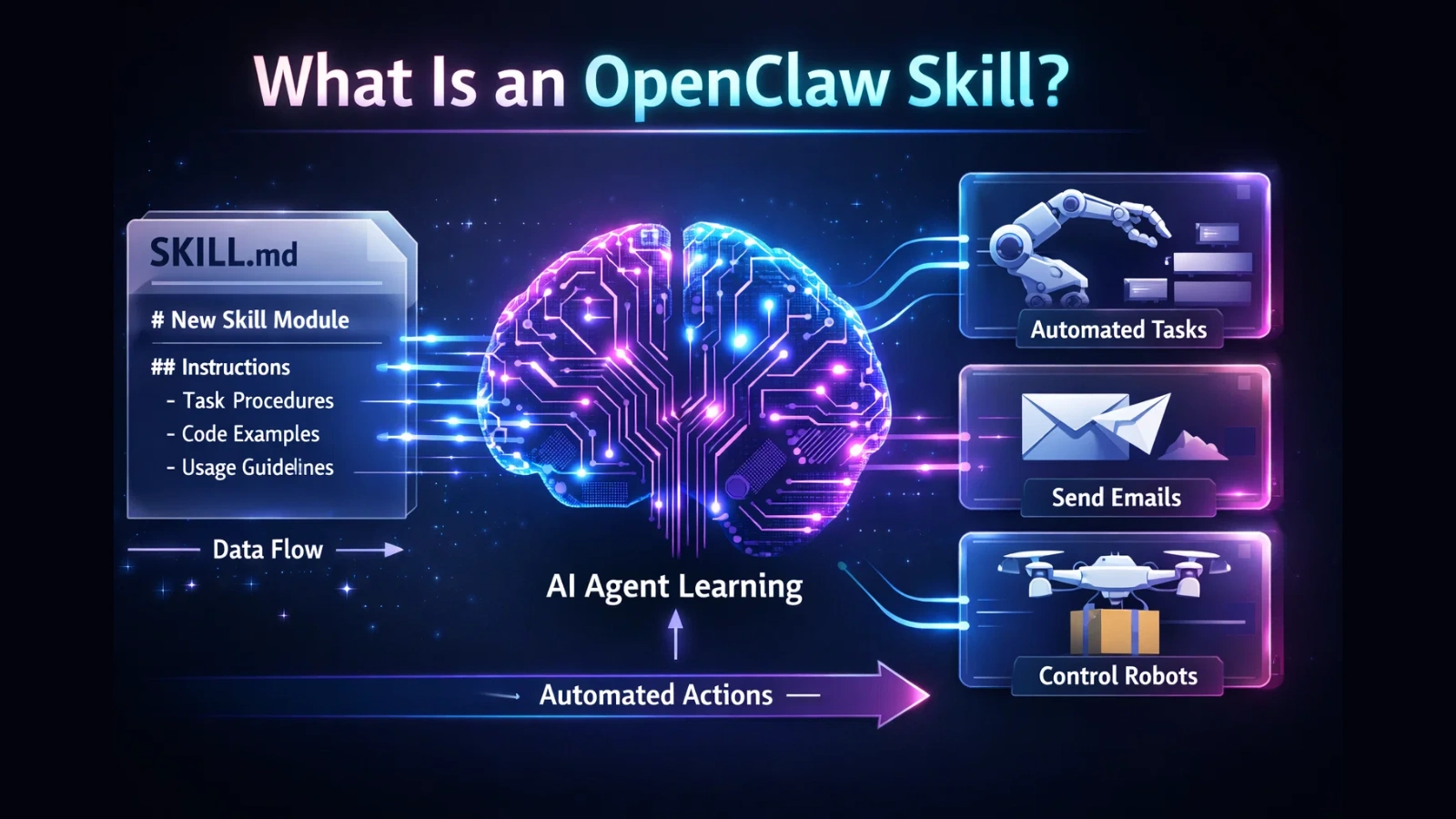
An OpenClaw skill is a Markdown file that teaches your AI agent a new capability. Simple as that.
It lives inside a folder with a SKILL.md file. That file contains plain-English instructions that the AI reads and acts on. No heavy SDK, no compiled code, no rigid APIs. Just structured natural language that tells the agent: “Here is what you can do, and here is how to do it.”
This is what makes the OpenClaw skill system so powerful. You describe the behavior, and the AI figures out when and how to use it.
Each skill can include:
- A SKILL.md file with YAML frontmatter and instructions
- A scripts/ folder with helper code in Node.js, Python, or Bash
- Environment variable requirements to connect to APIs
- Binary dependencies like curl or node
The agent loads these skills at startup and applies them when relevant, automatically.
Why OpenClaw Skills Are the Core of AI Automation
Here is the thing: a raw AI model is smart, but it is also general. It does not know your calendar. It does not know your GitHub repos. It does not know your smart home setup.
OpenClaw skills change that. They give the agent context, tools, and permissions to act inside your real environment.
Think about what that means for a business:
- Your agent can read your emails and draft replies
- It can check your GitHub CI pipeline and flag failures
- It can schedule meetings based on your preferences
- It can monitor server health and alert you to issues
- It can execute multi-step workflows, fully on its own
This is not future tech. This is available right now, with the OpenClaw skills awesome openclaw skills openclaw skills list available on ClawHub, the community marketplace.
Where Skills Live: The Loading System Explained
Before you install anything, understand how OpenClaw loads skills. There are three locations, and they follow a strict priority order:
Priority 1: Workspace skills located at ./skills/ inside your project folder. These are project-specific and override everything else. Great for team-shared configurations committed to version control.
Priority 2: User-global skills located at ~/.openclaw/skills/. These apply across all your projects on the same machine. Perfect for personal skills you use everywhere.
Priority 3: Bundled skills that ship with the OpenClaw installation. These are the defaults. They are the lowest priority and can be overridden by anything above.
If the same skill name exists in two locations, the higher-priority location wins. This lets you customize or patch any skill without touching the original.
And here is a feature developers love: hot-reloading. Edit a SKILL.md file and the agent picks it up within 1 to 2 seconds. No restart. This makes building and testing custom skills extremely fast.
The Full OpenClaw Skills List by Category
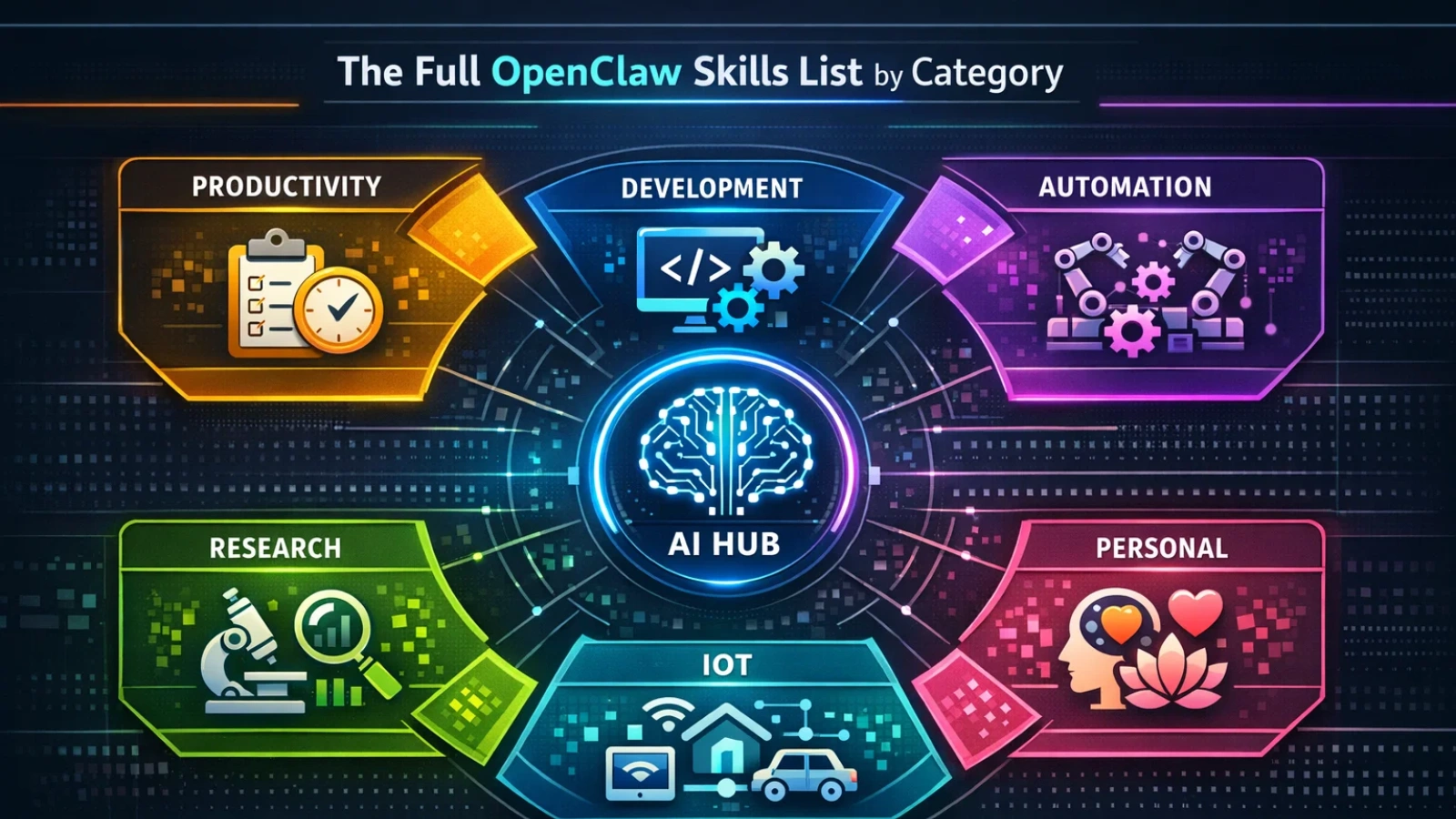
ClawHub, the community marketplace, currently hosts over 3,500 skills. The ecosystem grew from roughly 200 skills in November 2025 to over 3,500 by February 2026. That is a 17x increase in three months.
Here is a breakdown of the major categories and what is available:
Productivity Skills
These remain the most widely used skills on ClawHub.
Core tools you already listed
- Google Calendar — Create, read, update, and delete events
- Gmail Compose — Draft, send, label, and search emails
- Obsidian Vault — Read/write notes and manage backlinks
- Notion Sync — Query databases and create structured pages
Additional productivity capabilities
- Outlook Mail Manager — Send and organize Outlook emails
- Outlook Calendar Sync — Cross-calendar scheduling
- Slack Messenger — Send messages and monitor channels
- Slack Thread Summarizer — Auto-summarize long threads
- Microsoft Teams Assistant — Post and track team updates
- Zoom Meeting Manager — Create and manage meetings
- Google Meet Scheduler — Auto-generate meet links
- Meeting Notes Generator — Convert transcripts to notes
- Todoist Task Manager — Create and track tasks
- Trello Board Manager — Update cards and workflows
- Asana Workflow Sync — Manage projects and tasks
- ClickUp Task Operator — Full task lifecycle control
- Evernote Sync — Capture and organize notes
- Dropbox File Manager — Upload and organize files
- Google Drive Operator — Search, upload, and share files
- OneDrive Sync — Manage Microsoft cloud storage
- PDF Summarizer — Extract and summarize documents
- Document Translator — Translate files automatically
- Reminder Engine — Smart time-based reminders
Software Development Skills
Built for engineering automation and DevOps workflows.
Your listed skills
- GitHub Actions
- Code Review Pro
- Docker Manager
- Cron-backup
- Security-check
Additional development capabilities
- GitHub Repo Manager — Create branches and manage repos
- GitHub Issue Triage — Auto-label and prioritize issues
- GitLab CI Monitor — Track pipeline health
- Bitbucket Manager — PR and repo automation
- Pull Request Summarizer — Explain code changes
- Dependency Updater — Auto-update packages
- NPM Publisher — Publish packages automatically
- PyPI Publisher — Python package deployment
- Kubernetes Operator — Manage clusters
- Helm Chart Deployer — Release automation
- Terraform Runner — Infrastructure provisioning
- AWS Resource Manager — Control EC2, S3, Lambda
- Azure DevOps Connector — Pipeline automation
- GCP Cloud Operator — Manage Google Cloud services
- Log Analyzer — Parse and summarize logs
- Error Tracker — Monitor app crashes
- Test Runner — Execute automated tests
- Coverage Reporter — Track test coverage
- API Contract Tester — Validate endpoints
- Swagger Generator — Build API docs
- Commit Message Writer — Standardized commits
- Code Formatter — Enforce style rules
- Secret Scanner — Detect exposed keys
- Repo Security Auditor — Scan for vulnerabilities
Automation and Integration Skills
These connect OpenClaw with the outside world.
Your listed skills
- Zapier Bridge
- Smart Home Hub
- IFTTT Connector
- Agentmail-integration
Additional automation capabilities
- Make (Integromat) Connector
- Webhook Listener — Trigger from events
- Webhook Sender — Push outbound events
- RSS Feed Monitor — Track content updates
- Email Parser — Extract structured data
- Form Response Collector — Process submissions
- CRM Sync (generic) — Push leads to CRM
- Salesforce Connector
- HubSpot Sync
- Pipedrive Manager
- Stripe Events Listener
- PayPal Transaction Monitor
- Shopify Store Manager
- WooCommerce Sync
- Airtable Connector
- Supabase Bridge
- Firebase Sync
- Database Query Runner
- CSV Import/Export Tool
- Scheduled Workflow Runner
Search and Research Skills
High-value for analysts and growth teams.
Your listed skills
- Tavily Web Search
- Academic Deep Research
- Proactive-research
Additional research capabilities
- SERP Analyzer — Keyword intelligence
- Competitor Monitor — Track rival changes
- News Intelligence Feed — Real-time news scan
- Patent Search Assistant
- Market Research Compiler
- Trend Detector — Spot rising topics
- Social Listening Agent
- Reddit Insight Miner
- YouTube Research Assistant
- Content Gap Finder
- Citation Formatter — APA/MLA formatting
- Fact Checker — Source validation
- Knowledge Base Builder
- Entity Extractor
- Sentiment Analyzer
Smart Home and IoT Skills
Automation for connected environments.
Your listed skills
- Home Assistant (REST)
- Home Assistant CLI
- Homeassistant N8n Agent
Additional IoT capabilities
- HomeKit Bridge
- SmartThings Connector
- Philips Hue Controller
- Nest Thermostat Manager
- Ring Security Monitor
- IoT Device Health Checker
- Energy Usage Tracker
- Smart Routine Builder
- Voice Command Router
- MQTT Device Bridge
Health and Personal Development Skills
Growing fast in the ecosystem.
Your listed skills
- Longevity Assistant
- Apple Health Skill
- Personal Finance Tracker
Additional personal capabilities
- Habit Tracker
- Workout Planner
- Meal Planner
- Sleep Analyzer
- Meditation Coach
- Water Intake Tracker
- Calorie Logger
- Budget Forecaster
- Investment Tracker
- EMI Planner
- Subscription Monitor
- Goal Progress Tracker
How OpenClaw Skills Integrate with MCP
One of the most technically powerful features of the OpenClaw skill system is its support for the Model Context Protocol (MCP).
MCP is an open standard for connecting AI models to external tools and data sources. OpenClaw supports MCP through community-built adapters, which means it can connect to any MCP-compatible service: Notion, Linear, Stripe, GitHub, internal databases, and more.
There are three main MCP adapters available:
- openclaw-mcp-adapter: Uses stdio transport, no auth required. Best for local MCP servers.
- openclaw-mcp-plugin: Uses Streamable HTTP transport with API key auth. Best for remote and cloud services.
- openclaw-mcp (freema): OAuth2 support. Best for enterprise, multi-tenant environments.
The setup looks like this in practice:
bash
openclaw skill install openclaw-mcp-adapter
openclaw config set mcp.servers.notion.command “npx @notionhq/mcp-server”
openclaw config set mcp.servers.notion.env.NOTION_TOKEN “your-token-here”
After that, the agent automatically discovers all tools the MCP server exposes. You can say “Create a Linear ticket for the login bug” and the agent will use the Linear MCP server’s create_issue tool, automatically.
When to use MCP vs native skills:
Use a native OpenClaw skill when a well-maintained skill already exists for your use case. Use MCP when you need to connect to a complex service with many endpoints, like a full CRM or project management platform, where a native skill would be too limited.
Read More:
How OpenClaw AI Integration Helps Businesses Earn $10K+ in 7 Hours?
Using OpenClaw: What 1,000 Hours Of Testing Taught Me
OpenClaw Skills: How to Build Custom AI Capabilities in 10 Minutes
Building a Custom OpenClaw Skill in 5 Steps
Anyone can build a custom openclaw skill. No prior experience required. Here is the full process:
Step 1: Create the skill directory.
bash
mkdir -p ~/.openclaw/skills/my-custom-skill
Step 2: Write your SKILL.md file with frontmatter and instructions.
yaml
—
skillKey: my–custom–skill
primaryEnv: MY_API_KEY
requires:
env:
– MY_API_KEY
bins:
– curl
—
Then write plain English below the frontmatter: what the skill does, when to activate it, how to call the API, and how to format the response.
Step 3: Add any helper scripts to a scripts/ subdirectory if needed.
Step 4: Test it immediately. No restart required. Hot-reloading picks it up within seconds.
Step 5: Iterate. Refine the instructions, add edge case handling, and when ready, publish to ClawHub with openclaw skill publish.
Most simple custom skills take 5 to 15 minutes to build from scratch.
Security: What You Must Know Before Installing Any Skill
This section is not optional reading. OpenClaw does not sandbox skills. Every skill you install runs with the same system access as the agent itself.
Community audits estimate that 12 to 20% of skills on ClawHub contain malicious or privacy-violating behavior. This is a real, active risk. There is no manual review queue on ClawHub. Skills go live immediately after publishing.
Before installing any openclaw skill, run through this checklist:
- Check the publisher: How old is their account? Do they have other published skills or a real GitHub presence?
- Look at the star count: A skill with fewer than 10 stars after a month of being live is a red flag.
- Read the source code: A legitimate skill has a readable SKILL.md under 200 lines. If there are thousands of lines of obfuscated JavaScript in the scripts folder, walk away.
- Check what environment variables it requests: A weather skill has no business asking for AWS_SECRET_ACCESS_KEY.
- Verify the description matches the code: Read what the skill claims to do. Then read what it actually does. If they do not match, do not install it.
- Use a scanner: Run the skill through ClawDex for a preliminary security scan before installation.
- Validate the name spelling: Typosquatting is real. clawhub is legitimate. clawdhub is not.
Use this risk framework:
Low risk skills: weather, unit conversion, text formatting. Install freely after a quick audit.
Medium risk skills: calendar, email, note-taking. Review the source code and check the publisher first.
High-risk skills: financial trading, social media posting. Do a full audit and sandbox test before deploying.
Critical risk skills: anything requesting SSH keys or cloud credentials. Do not install unless you wrote it yourself.
Powered by Globussoft AI: We Handle the Integration for You

Understanding OpenClaw skills is one thing. Implementing them correctly inside a business environment is another.
That is where Globussoft AI comes in.
We specialize in AI OpenClaw integration for businesses, startups, and teams that want to move fast without cutting corners on security or reliability. Whether you need a single OpenClaw skill wired into your existing stack, a full multi-agent setup across your organization, or a custom skill built from the ground up for your internal tools, our team handles it end to end.
What Globussoft AI does for you:
- Audit and vet skills before they touch your production environment
- Build custom OpenClaw skills tailored to your specific workflows
- Set up MCP integrations with your existing SaaS tools
- Deploy OpenClaw securely on DigitalOcean, AWS, or your own infrastructure
- Train your team to manage and extend the system going forward
You do not need to figure this out alone. AI adoption works best when it is implemented by people who have already made the mistakes, learned from them, and built the right guardrails.
Ready to get started? Reach out to the Globussoft AI team and let us build your OpenClaw setup the right way, from day one.
Deploying Skills at Scale: Cloudflare Workers
For teams running OpenClaw in production, the moltworker package lets you deploy skills as Cloudflare Workers. This gives you 99.95% uptime, edge-network latency, and a generous free tier of 100,000 requests per day.
The tradeoff: Workers are stateless and have no file system access. They are best for always-on skills that call external APIs, not for skills that need to read or write local files.
bash
npm install -g moltworker
moltworker init my-skill-worker
moltworker deploy –name my-skill-worker
For development and personal use, local Node.js is simpler. For production team deployments, Cloudflare Workers is the better choice.
Conclusion
OpenClaw skills turn AI agents from smart chatbots into real operators. With the right skills, your agent can automate work, connect tools, and handle complex tasks with speed. The key is choosing wisely, testing OpenClaw carefully, and keeping security front and center. Start small. Add only what you need. Then scale with confidence. When implemented correctly, OpenClaw becomes a powerful automation engine for modern teams. If you want faster results without the trial-and-error, Globussoft AI can help you deploy, secure, and customize your OpenClaw setup the right way.
FAQs
- Are OpenClaw skills safe to install from ClawHub?
Not always. Some community skills may contain risky code. Always check the publisher, review the SKILL.md, and scan the package before installing any OpenClaw skill. - How many OpenClaw skills should a beginner install first?
Start with 2–5 essential skills only. Installing too many at once can create conflicts and security risks. Grow your stack gradually as your workflows become clearer. - Can OpenClaw skills run fully automated workflows?
Yes. With the right configuration, OpenClaw skills can trigger multi-step workflows like sending emails, updating tools, and monitoring systems without manual input. - What is the biggest mistake teams make with OpenClaw skills?
Most teams install skills too quickly without auditing them. This can expose credentials or break workflows. Careful review and staged testing prevent major problems. - Do I need coding knowledge to build an OpenClaw skill?
No heavy coding is required. Most simple OpenClaw skills use plain-English instructions inside SKILL.md. Basic API understanding helps, but beginners can build useful skills in minutes.