
Imagine starting your workday and finding that the repetitive tasks are already handled. Reports are compiled, updates are summarized, and routine monitoring is done without reminders or follow-ups. That is the idea behind Kimi OpenClaw.
Instead of manually managing every small task, businesses can run AI agents that work quietly in the background and complete those tasks automatically.
Many teams are already using agent-based systems to handle work that previously consumed hours each week. And getting started does not necessarily require a full development team.
In this blog, you will learn what Kimi OpenClaw is, how it works behind the scenes, and how to complete your Kimi OpenClaw setup so you can deploy your first AI agent and automate routine workflows. By the end, you will have a clear understanding of whether it fits your business and how to move forward.
Listen To The Podcast Now!
What Is Kimi Claw?

The term “Kimi OpenClaw” often mixes several components together.
Kimi K2.5 – the model
Kimi K2.5 is the AI model that powers the agent’s reasoning and decision-making. Developed by Moonshot AI, it is designed for complex tasks that involve multiple steps, tool usage, and structured problem-solving.
The model operates with 1 trillion total parameters, with 32 billion activated parameters per request a Mixture-of-Experts (MoE) design that delivers frontier-level performance at a fraction of the computational cost. It supports a 256K long-context window, making it well-suited for large documents and extended workflows. In simple terms, that means it can process very large documents or long conversations without losing track of earlier information.
For businesses working with research reports, contracts, or large knowledge bases, that extended context can make a noticeable difference.
From a cost perspective, Kimi K2.5 is highly competitive. The API is priced at approximately $0.60 per million input tokens and $2.50 per million output tokens a fraction of what comparable models charge. Additionally, repeated or cached inputs are charged at just $0.15 per million tokens, reducing costs by up to 75% for workflows with recurring prompts
Kimi Claw — the platform
Kimi OpenClaw is the cloud platform built around the OpenClaw framework. Instead of installing software or configuring servers, users can deploy agents directly from a web interface.
The platform includes several built-in capabilities:
- Persistent memory for agents
- Cloud storage (around 40GB in standard plans)
- Access to ClawHub integrations
- Scheduled task automation
- Messaging integrations such as Telegram and WhatsApp
This setup allows businesses to launch an agent quickly without managing infrastructure.
How these components connect
Each piece serves a different role:
- OpenClaw defines the architecture for AI agents
- Kimi K2.5 provides the intelligence that powers those agents
- Kimi Claw is the platform that allows them to be deployed easily
When people refer to “Kimi OpenClaw,” they usually mean OpenClaw agents running on the Kimi K2.5 model, either through the Kimi Claw platform or through a self-hosted setup.
How Kimi OpenClaw Works
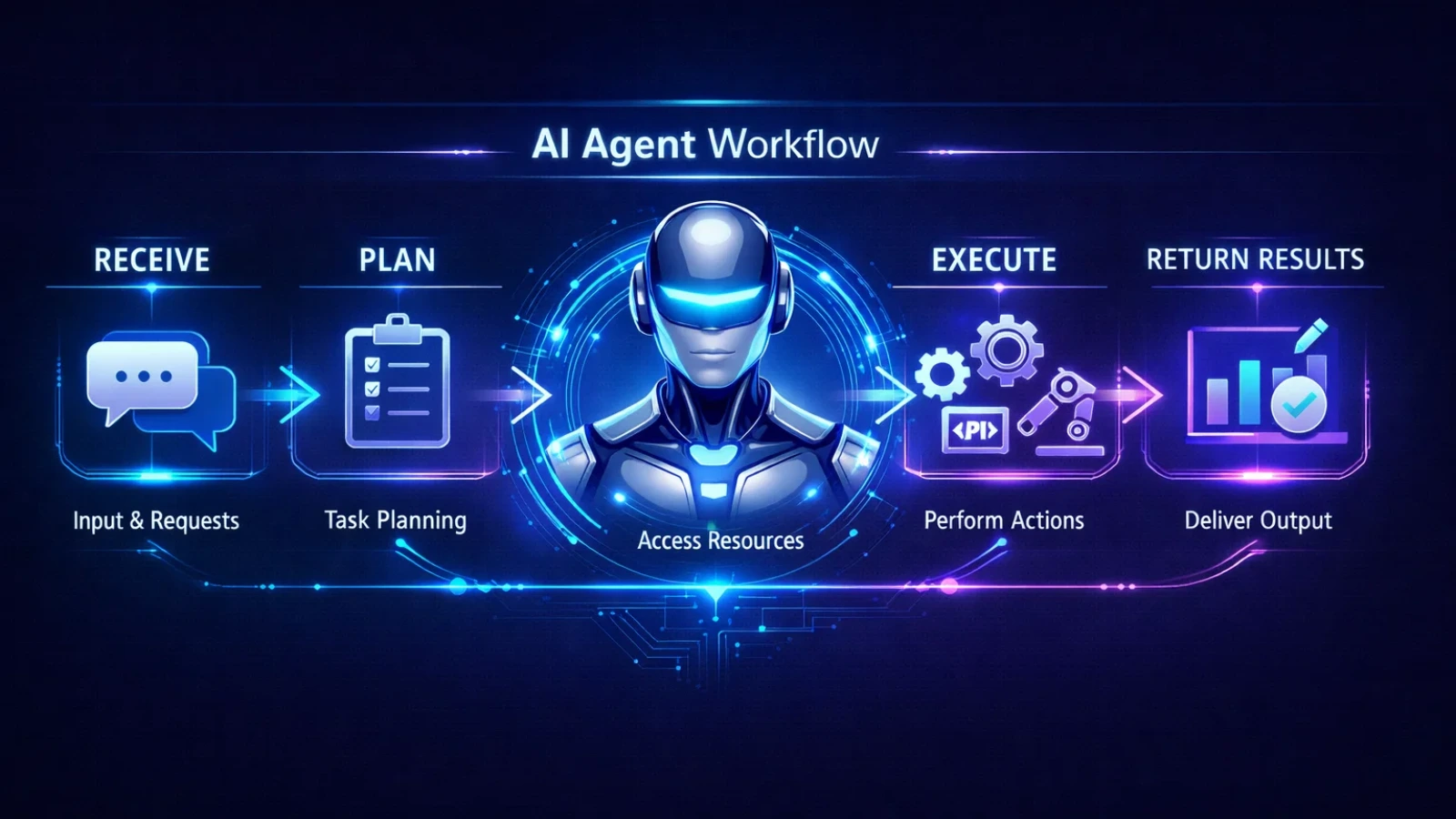
Behind every OpenClaw agent is a structured loop that guides how tasks are completed. Understanding this process helps when designing workflows.
Receive
The agent first receives a task. This might come from a user request, a scheduled trigger, or an automated input such as a new email or data update.
Plan
Before taking action, the agent breaks the task into smaller steps. It decides what information is needed, which tools to use, and the order in which those tools should be applied.
The agent then calls on its available skills, leveraging OpenClaw automation to streamline processes. For example:
Use tools
The agent then calls on its available skills. For example:
- Web search to gather new information
- File tools to read or generate documents
- Email connectors to retrieve or send messages
- APIs to pull data from other systems
These tools allow the agent to interact with real services rather than just generating text.
Execute
The agent performs the steps it planned earlier. If a result is incomplete or unexpected, it can adjust its approach and try again.
Return results
Once the task is complete, the agent delivers the output. This might appear as a report, a message in a communication channel, or an input for another workflow step.
Remember
Agents also maintain persistent memory. They can store instructions, preferences, or historical information from earlier tasks.
Over time, this helps the agent respond more accurately to how your team works.
For complex workflows, agents can also create sub-agents that run specialized tasks in parallel. One agent might handle research while another prepares summaries or drafts responses.
Deployment Options for Kimi OpenClaw: What You Need to Know
Before setting up your first agent, it helps to understand the two main deployment options.
Option A: Kimi OpenClaw Cloud
For most businesses, the cloud platform is the simplest route.
You will need:
- A Kimi account
- A subscription plan (starting around $39 per month)
- A web browser
Deployment usually takes less than 15 minutes, and no coding is required.
Option B: Self-Hosted OpenClaw
Technical teams may prefer running OpenClaw on their own infrastructure.
This approach requires:
- A Linux server or VPS
- Node.js is installed on the server
- An API key from the Moonshot AI developer platform
- Basic command-line knowledge
- A configuration file for the agent setup
Self-hosting provides greater control over infrastructure and data handling.
Choosing the right option
For teams looking for a quick start, the cloud platform is typically the best choice.
Organizations that have strict data policies, high usage volumes, or existing DevOps infrastructure may benefit from the self-hosted approach.
Many companies start with the cloud platform and later evaluate self-hosting once their automation workflows expand.
Deploying Kimi OpenClaw: Step by Step

Launching your first agent through the cloud platform is straightforward.
Step 1: Create a Kimi account
Visit the Kimi website, sign up for an account, and select a subscription plan. The Allegretto tier generally covers most small and medium business use cases.
Step 2: Deploy your ClawBot
Navigate to the bot deployment page and choose the option to deploy a new agent. The platform automatically creates the cloud environment needed to run it.
Step 3: Write your system prompt
The system prompt defines the role of the agent and how it should behave.
A useful prompt usually includes:
- The agent’s role
- Basic company context
- Preferred communication style
- Recurring responsibilities
For example:
“You are the operations assistant for a B2B software company. Monitor industry news, summarize documents, and prepare weekly performance reports. Communicate clearly in professional business English.”
A well-written prompt significantly improves the quality of results.
Step 4: Add skills from ClawHub
Next, select the integrations that match your workflow. A practical starting set often includes:
- Web search
- Email access
- Calendar tools
- File readers
- Messaging integrations
Starting with a small set of relevant skills keeps the system easier to manage.
Step 5: Create a scheduled task
A daily briefing is a simple first automation.
For example, the agent could search for industry news every morning and send a short summary to a messaging channel.
This provides an easy way to test how the agent performs.
Step 6: Connect communication channels
Link Telegram or WhatsApp so the agent can send updates and receive requests without needing a dashboard.
This step makes the agent much more practical for everyday use.
Step 7: Test and refine
Before relying on the agent for important workflows, test it with several real tasks.
If results are not ideal, adjust the system prompt or refine the tools you have enabled. Small prompt changes often produce major improvements.
Deploying Self-Hosted OpenClaw
For teams that want full infrastructure control, OpenClaw can also be deployed on private servers.
The typical setup process includes:
- Provisioning a Linux server, often using Ubuntu
- Installing Node.js and necessary dependencies
- Cloning the OpenClaw repository from GitHub
- Generating an API key from the Moonshot AI developer platform
- Creating a configuration file that connects the framework to the Kimi K2.5 model
- Starting the agent service and linking it to your preferred interface
Self-hosting allows deeper integration with internal databases, private APIs, and on-premise systems.
However, it does require technical expertise to maintain and monitor the environment.
Business Use Cases After Deployment
Once your agent is running, the real value comes from the workflows you automate.
Here are several practical examples.
Industry monitoring
Agents can scan news sources and competitor activity each morning, then deliver a short briefing before your team begins work.
Automated performance reports
If connected to analytics tools or spreadsheets, an agent can generate weekly reports that summarize performance trends and highlight key changes.
Document summarization
Agents can read lengthy contracts, research papers, or internal reports and extract the most important decisions, risks, and deadlines.
Customer inquiry triage
Incoming messages can be categorized by topic or urgency, with draft responses prepared for review.
Meeting preparation
Before important calls, the agent can compile a quick research brief about the company, participants, and recent news.
These small automations can save teams a surprising amount of time over the course of a week.
Also Read:
How an OpenClaw AI Agent Can Automate Workflows from a $5 Server?
Openclaw Installation Services: Production-Ready In 24 Hours
Things to Consider Before Starting
There are a few practical details to keep in mind when adopting agent systems.
The platform is still evolving.
While capable, it is still developing. Critical workflows should include human review steps.
Testing requires a paid plan.
There is currently no free tier available for experimentation.
Data is processed in the provider’s cloud environment.
Organizations with strict compliance policies should review data handling policies or consider self-hosting.
External content can influence agents.
If agents read external sources automatically, poorly formatted or malicious content may affect outputs. Careful prompt design helps reduce this risk.
Document workflows may need testing.
File handling works well in most cases, but testing document-heavy workflows before relying on them is recommended.
How GlobusSoft AI Helps Businesses Deploy AI Agents

Setting up an AI agent is relatively straightforward. Building one that actually fits your workflows, works reliably, and integrates with your systems takes deliberate planning.
Most teams realize that the gap between a functional agent and a valuable one comes down to three things: how workflows are designed, how prompts are structured, and how well the agent connects with existing tools.
At GlobusSoft AI, we help businesses deploy and operationalize Kimi OpenClaw with a focus on real-world usability, not just setup.
Here’s how we typically support clients:
End-to-end deployment
We set up your Kimi OpenClaw environment on your infrastructure, ensuring a fully self-hosted and private setup where your data stays within your control. From initial configuration to final testing, everything is ready to run before handover.
Workflow design
We identify repetitive, high-impact tasks across your operations and design agent workflows tailored to them. This includes leveraging scheduling, cron jobs, and event-based triggers so your automations run consistently without manual input.
System integration
Your agent is only as useful as the systems it can access. We connect it with your existing tools such as CRM platforms, internal databases, reporting dashboards, and communication channels, ensuring smooth data flow across your stack.
Skill customization and expansion
Kimi OpenClaw comes with a wide range of built-in capabilities, from document handling to web automation. We configure and extend these skills, and where needed, build custom capabilities aligned with your business use cases.
Automation across browser and voice
We enable advanced automations using browser control and voice interactions, allowing your agent to perform actions, retrieve information, and execute workflows in a more natural and efficient way.
Prompt engineering
A well-structured prompt defines how your agent behaves. We design and refine prompts based on your specific business context so outputs remain consistent, accurate, and usable by your team.
Ongoing support and optimization
As your operations evolve, your agent should evolve with them. We continuously refine workflows, add new automations, and optimize performance to keep everything aligned with your growing needs.
If you want Kimi OpenClaw up and running in your business without spending weeks experimenting and troubleshooting, we help you get there faster with a system that’s built to actually deliver value.
Talk to our team. We will look at your workflows and show you exactly what can be automated.
Conclusion
AI agents are no longer something only large enterprises with dedicated engineering teams can run. Kimi OpenClaw has made it practical for businesses of any size to deploy an autonomous assistant that handles real work monitoring, summarizing, reporting, triaging without requiring constant input from your team.
The technology itself is straightforward once you understand the three layers: OpenClaw as the framework, Kimi K2.5 as the model, and Kimi Claw as the platform that brings it all together. Whether you go with the cloud deployment or a self-hosted setup depends on your technical capacity and data requirements, but either way, the path to a live agent is shorter than most people assume.
What takes time is not the deployment. It is getting the workflows right, connecting the right tools, and writing prompts that make the agent genuinely useful rather than just technically functional. That is where most teams either invest the effort themselves or bring in help.
If you are evaluating Kimi OpenClaw for your business, the best next step is a simple one: deploy a basic agent, give it one real workflow to run, and observe how it performs. The practical experience will tell you more than any guide can.
And if you want that first deployment done properly, without the trial and error, GlobusSoft AI is here to help.
Frequently Asked Questions
Is Kimi OpenClaw free to use?
The cloud platform requires a subscription starting at around $39 per month. Self-hosting can reduce costs but requires technical setup.
Do I need coding skills to use Kimi OpenClaw?
No. Most setup tasks can be handled through the web interface. The main configuration happens through the system prompt written in plain language.
How is this different from a chatbot?
Chatbots mainly respond to prompts. AI agents can initiate tasks, use external tools, and run automated workflows.
Can OpenClaw run other AI models?
The open-source framework can connect to different models through API configuration. The Kimi OpenClaw platform specifically uses the Kimi K2.5 model.
Is business data secure?
Data is processed on the provider’s infrastructure. Companies with strict compliance requirements should review the platform’s policies before deployment.