
Artificial intelligence is no longer a competitive advantage; it is a baseline expectation. From healthcare diagnostics to real-time fraud detection, organizations across every industry are racing to embed intelligent systems into their products and operations. And the infrastructure powering much of this transformation? The Google Cloud Platform.
Google Cloud Platform (GCP) has steadily evolved from a general-purpose cloud provider into one of the most comprehensive AI development ecosystems on the market. Whether you are a developer training your first machine learning model or an enterprise architect deploying large-scale generative AI solutions, GCP offers the tools, services, and global infrastructure to match your ambition. This article breaks down exactly why and how Google Cloud Platform has become a cornerstone of modern AI development.
Listen To The Podcast Now!
What Is Google Cloud Platform and Why Does It Matter for AI?

Google Cloud Platform is Google’s suite of cloud computing services that runs on the same infrastructure that powers Google Search, YouTube, and Gmail. It offers more than 200 products spanning compute, storage, networking, data analytics, and, most relevantly, artificial intelligence and machine learning.
What sets GCP apart from other cloud providers is that Google is not simply offering AI tools on top of a cloud. AI is woven into the DNA of the platform itself. Google has been doing machine learning research for decades, and the fruits of that research, from TensorFlow to Transformer architectures, now power the services available to GCP customers.
For AI developers, this means access to world-class models, purpose-built hardware (Tensor Processing Units, or TPUs), and a unified workflow that takes a project from raw data to a deployed model without leaving the platform.
How to Get Started with the Google Cloud Platform Console
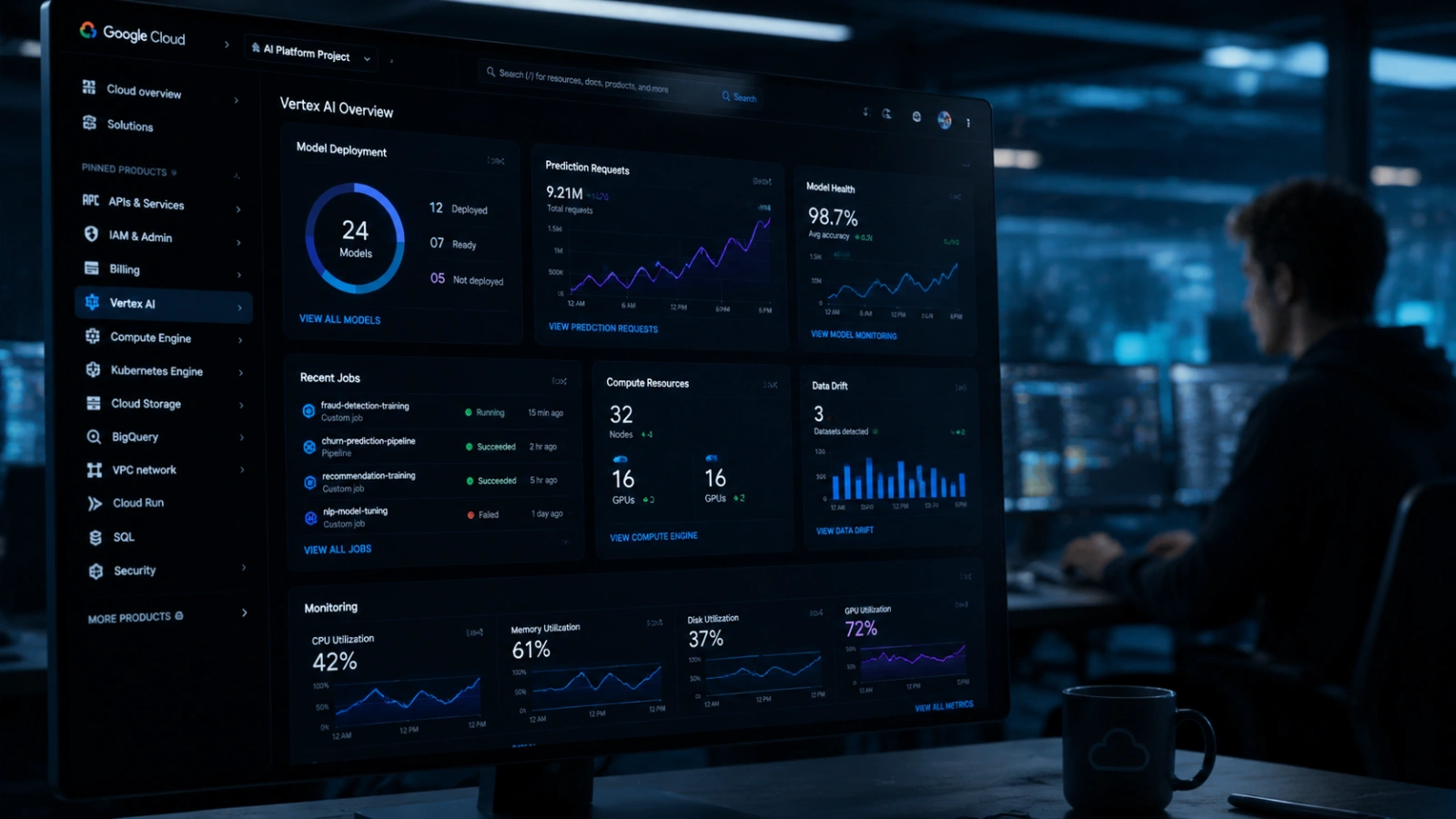
Every AI project on GCP begins in the same place: the Google Cloud Platform Console. This is the browser-based dashboard that gives you access to all of GCP’s services from a single interface.
The console is intuitive even for beginners, but it is powerful enough for experienced engineers managing multi-region deployments. Here is what you can do from the GCP Console relevant to AI work:
Create and manage projects. Every GCP resource lives inside a project. The console lets you spin up a new project in seconds, giving you an isolated environment with its own billing, permissions, and service configurations.
Configure IAM roles. Identity and Access Management (IAM) controls who can access what. For AI teams, this is critical — you will want data scientists to have access to Vertex AI and BigQuery, while restricting access to production deployment pipelines. The console makes role assignment straightforward with predefined roles for common AI workflows.
Enable APIs and connect services. Vertex AI, Cloud Storage, BigQuery, and other services need to be enabled before use. The console provides a searchable API library, and enabling a service takes a single click.
Monitor usage and costs. AI workloads, especially model training, can be resource-intensive. The console’s billing dashboard and budget alerts help teams stay within budget without micromanaging every GPU hour.
For teams new to GCP, the console is the fastest path to getting an AI project off the ground. It abstracts away infrastructure complexity while keeping advanced configuration options accessible when you need them.
How Cloud Machine Learning Works on Google Cloud Platform
At the core of GCP’s AI offering is its cloud machine learning infrastructure, centered around Vertex AI, Google’s fully managed ML platform.
Vertex AI brings together the full machine learning lifecycle under one roof. Here is what that lifecycle looks like in practice:
Data Preparation
Before any model can be trained, data needs to be ingested, cleaned, and organized. GCP connects Vertex AI directly to Cloud Storage (for raw file storage) and BigQuery (for structured data at scale). Data scientists can query, transform, and version datasets without ever leaving the GCP ecosystem.
Model Training: AutoML vs. Custom Training
One of the standout features of GCP’s cloud machine learning stack is the flexibility it offers across skill levels.
AutoML allows teams without deep ML expertise to build high-quality models by simply providing labeled data. Google handles architecture selection, hyperparameter tuning, and training under the hood. AutoML supports image classification, text analysis, tabular data prediction, video intelligence, and more.
Custom training is designed for ML engineers who want full control. You can bring your own model architecture whether built in TensorFlow, PyTorch, or scikit-learn, and train it on GCP’s infrastructure, including TPUs and GPUs. Custom training jobs are configurable at the compute, framework, and hyperparameter levels.
Model Deployment and Serving
Once trained, models are deployed to Vertex AI Endpoints, where they serve real-time predictions. GCP handles auto-scaling, so your endpoint can handle ten requests per minute or ten thousand without manual intervention.
For batch predictions processing large datasets offline, Vertex AI Batch Prediction runs jobs on demand without maintaining a live endpoint, which is more cost-efficient for non-time-sensitive use cases.
MLOps and Model Management
Vertex AI includes a Model Registry for versioning trained models and Vertex AI Pipelines for orchestrating multi-step ML workflows (think: data preprocessing → training → evaluation → deployment as a single automated pipeline). These MLOps capabilities are what make the difference between a one-off experiment and a production-grade AI system.
How Google Cloud AI Powers Modern Applications
Beyond Vertex AI’s model training infrastructure, Cloud AI encompasses a rich set of pre-built APIs and specialized tools that let developers add intelligence to their applications without building models from scratch.
Gemini Models
Google’s Gemini family of large language models is available through Vertex AI, giving enterprise developers access to Google’s most capable foundation models. Gemini can handle multimodal inputs text, images, audio, video, and code and is accessible via API for use cases ranging from document summarization to complex reasoning tasks.
Crucially, Gemini on Vertex AI comes with the enterprise controls that businesses need: data residency options, private networking, no data sharing with Google for model improvement, and audit logging.
AI APIs for Common Tasks
Not every AI use case requires a custom model. GCP’s library of pre-trained AI APIs lets developers add specific capabilities with minimal code:
- Vision AI — object detection, image labeling, OCR, face detection, and product search
- Natural Language API — sentiment analysis, entity recognition, content classification, and syntax analysis
- Speech-to-Text and Text-to-Speech — transcription and voice synthesis supporting over 125 languages
- Translation API — real-time, high-quality translation powered by Google’s neural machine translation models
- Document AI — intelligent document processing for parsing invoices, contracts, and forms at scale
These APIs are production-ready, battle-tested at Google scale, and priced per use, making them accessible for startups and enterprises alike.
Generative AI Tools
Google Cloud AI has invested heavily in generative AI tooling. Vertex AI’s Model Garden provides access to a curated collection of foundation models, including Google’s own Gemini, Imagen (image generation), and Codey (code generation), as well as open-source models like Llama and Mistral. Developers can fine-tune these models on their own data or use them out of the box.
Google Cloud Solutions: Real-World AI at Scale
Having powerful tools is one thing. Putting them to work in industry-specific contexts is another. Google Cloud solutions are pre-built architectures and reference implementations designed to solve common business challenges, often with AI at their center.
Healthcare and Life Sciences
GCP’s healthcare solutions include specialized tools for medical imaging analysis (using Vision AI), clinical NLP for processing unstructured clinical notes, and genomics pipelines. Google Cloud Healthcare API provides FHIR-compliant data interchange, making it easier to integrate AI models with existing electronic health records systems.
Financial Services
In finance, latency and accuracy are non-negotiable. GCP’s financial services solutions leverage AI for real-time fraud detection, algorithmic trading support, risk modeling, and customer personalization. BigQuery’s ability to run SQL queries over petabytes of transaction data in seconds makes it a natural foundation for financial AI workloads.
Retail and E-Commerce
Google Cloud’s retail solutions include AI-powered product recommendations (built on the same technology behind Google Shopping), visual search, demand forecasting, and supply chain optimization. Retailers can connect inventory data, customer behavior signals, and external factors like weather or seasonality into a unified predictive model.
Media and Entertainment
For content-heavy industries, GCP offers video transcription, automated content moderation, and AI-driven content discovery. Video AI can analyze video at scale, extracting topics, entities, and explicit content flags — critical for platforms managing millions of hours of user-generated content.
These Google Cloud solutions are not just marketing collateral. They represent validated reference architectures that reduce the time from concept to production deployment, often from months to weeks.
End-to-End AI Development: How GCP Ties It All Together
The real power of Google Cloud Platform for AI development is not any single service; it is the integration between them.
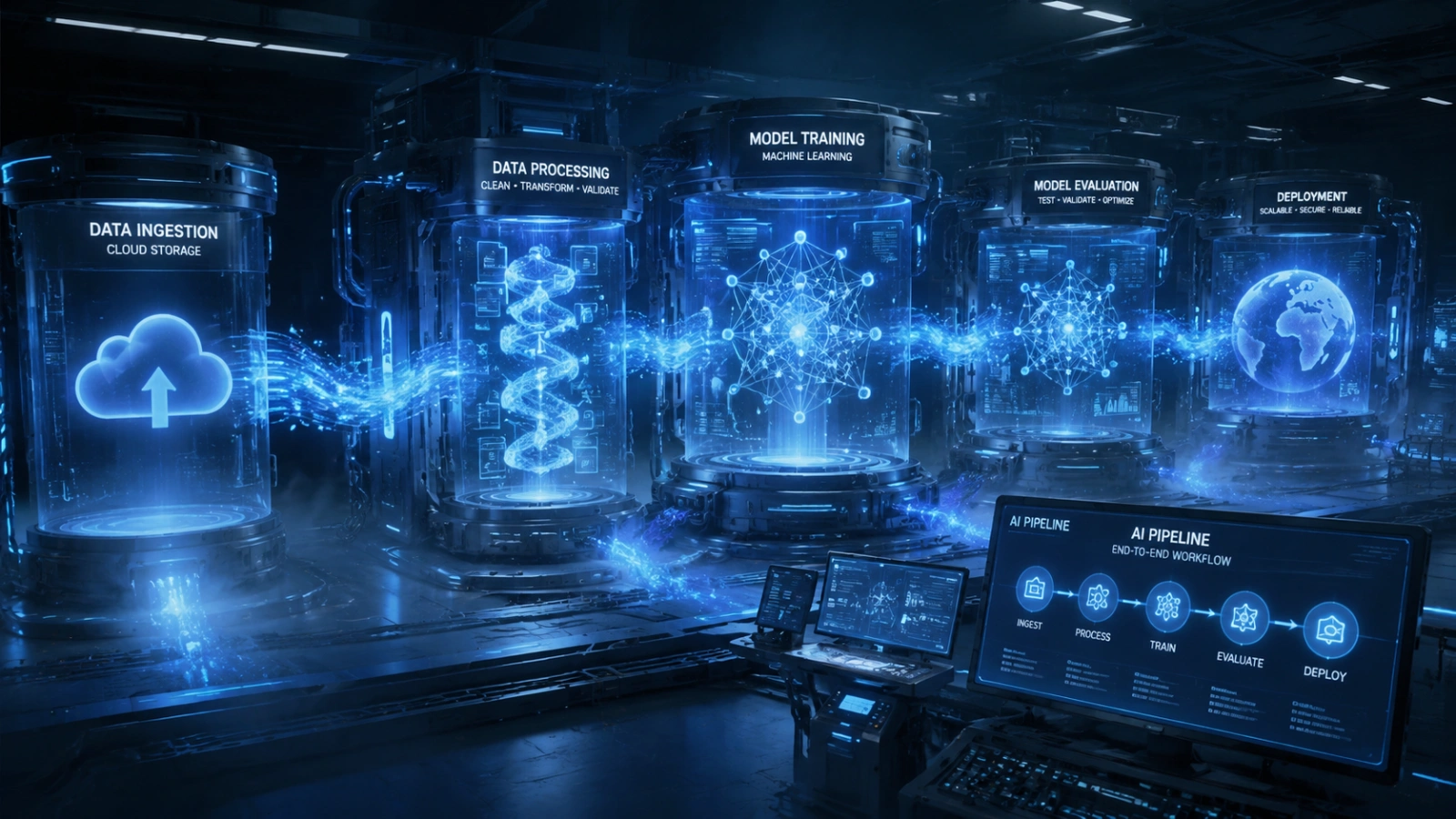
Consider a complete AI development workflow on GCP:
- Data ingestion — Raw data lands in Cloud Storage or is streamed in via Pub/Sub
- Data processing — Dataflow and BigQuery handle transformation and feature engineering
- Experimentation — Data scientists work in Vertex AI Workbench (Jupyter-based notebooks) with direct access to GCP data services
- Training — Models train on Vertex AI using custom containers or AutoML, leveraging TPU/GPU infrastructure
- Evaluation — Vertex AI Experiments tracks metrics across training runs; Vertex Explainable AI helps interpret model decisions
- Deployment — Models deploy to Vertex AI Endpoints or Cloud Run for scalable serving
- Monitoring — Vertex AI Model Monitoring detects data drift and model degradation in production
- CI/CD — Cloud Build and Vertex AI Pipelines automate the retraining and redeployment cycle
Each step connects to the next without friction. There is no need to export data to an external tool, reconfigure access permissions, or switch between disparate interfaces. This unified workflow is what makes GCP genuinely productive for AI teams, not just capable, but fast.
Also Read:
OpenClaw Consulting Services: What Companies Actually Pay For
Unlock Faster AI Innovation Using GlobussoftAI on Google Cloud Platform
AI development today demands more than just powerful models—it requires speed, scalability, and a reliable infrastructure that can support end-to-end execution. This is where the combination of GlobussoftAI and Google Cloud Platform becomes highly effective for modern AI-driven organizations.
By leveraging Google Cloud’s ecosystem, including Vertex AI, BigQuery, Cloud Storage, and advanced AI APIs, GlobussoftAI enables streamlined development workflows that reduce the time from idea to deployment. Instead of managing complex infrastructure layers, teams can focus directly on building, training, and optimizing AI models.
This approach ensures smoother execution of critical AI stages and faster production readiness. It also helps organizations move from experimentation to real-world deployment with greater efficiency and control.
Key Highlights
- Speed from idea to deployment with optimized AI workflows
- Use of scalable Google Cloud infrastructure (GPUs & TPUs) for model training
- Seamless data handling with BigQuery and Cloud Storage
- End-to-end AI pipeline support from training to deployment
- Improved model performance through iterative optimization
- Reduced infrastructure complexity with managed cloud services
For businesses aiming to accelerate their AI adoption, GlobussoftAI provides a practical pathway to harness the full potential of Google Cloud Platform, making advanced AI capabilities more accessible, scalable, and production-ready.
Why GCP Over Other Cloud Providers?
Fair question. AWS and Azure are both serious AI platforms. So what makes Google Cloud Platform the right choice for AI work specifically?
Proprietary AI research advantage. Google invented the Transformer architecture (the foundation of most modern LLMs), TensorFlow and has been running large-scale ML in production longer than any other company. That research translates into better tooling and better models available on the platform.
TPUs. Google’s Tensor Processing Units are custom silicon designed specifically for AI workloads. For training large models, TPUs offer a significant performance advantage over general-purpose GPUs.
BigQuery. No other cloud provider has a data warehouse with BigQuery’s combination of scale, SQL familiarity, and native ML capabilities (BigQuery ML lets you train models directly in SQL). For data-heavy AI teams, this is a meaningful differentiator.
Gemini integration. As Google’s flagship LLM, Gemini is most deeply integrated on GCP — both in terms of access and enterprise controls.
Final Thoughts
The landscape of AI development is moving fast, and the infrastructure choices teams make today will shape what they can build tomorrow. Google Cloud Platform offers a rare combination: the depth of a serious enterprise cloud, the breadth of a full-stack AI ecosystem, and the credibility of a company that has been doing AI at scale longer than almost anyone.
From navigating the Google Cloud Platform Console on day one to building production-grade cloud machine learning pipelines with Vertex AI, to deploying intelligent applications using Google Cloud AI APIs, to leveraging industry-specific Google Cloud solutions, GCP provides a coherent, integrated path for AI development at every stage and every scale.
For teams serious about building AI products that last, GCP is not just a cloud provider. It is a strategic infrastructure decision.
FAQ
- How to Use Google Cloud Platform Console for AI Projects?
The Google Cloud Platform Console is the central dashboard where you manage all AI and cloud resources. To use it for AI projects, you start by creating a project, enabling APIs like Vertex AI, and setting up billing. From there, you can access datasets, configure storage with Cloud Storage or BigQuery, and train machine learning models using integrated tools like AutoML or custom training pipelines. The console acts as the control center for building, deploying, and monitoring AI workflows efficiently.
- How Does Cloud Machine Learning Work on Google Cloud Platform?
Cloud Machine Learning on Google Cloud Platform works by providing scalable infrastructure and pre-built tools for training, testing, and deploying models. Instead of relying on local systems, you use cloud-based resources like Vertex AI to process large datasets, train models using GPUs or TPUs, and deploy them as APIs. This allows developers to build AI systems faster, scale automatically, and manage the entire machine learning lifecycle in one ecosystem.
- What Is Google Cloud AI and How Does It Power Modern Applications?
Google Cloud AI is a suite of artificial intelligence services and tools that help developers integrate intelligent features into applications. It includes pre-trained APIs for vision, language, speech, and generative AI models like Gemini. These services allow apps to understand images, process natural language, and generate responses in real time. By using Google Cloud AI, businesses can build smarter, more responsive, and automated applications at scale.
- What Are Google Cloud Solutions and How Do They Help AI Development?
Google Cloud Solutions refer to industry-specific cloud services and architectures designed to solve real-world business problems. In AI development, these solutions provide ready-to-use frameworks for sectors like healthcare, finance, retail, and logistics. They combine data storage, analytics, and machine learning tools to help organizations build AI-driven systems faster, reduce development time, and ensure secure, scalable deployment on Google Cloud Platform.
- How Does Google Cloud Platform Support End-to-End AI Development?
Google Cloud Platform supports end-to-end AI development by offering a complete pipeline—from data collection to model deployment. Developers can ingest data using BigQuery, process it with Dataflow, train models using Vertex AI, and deploy them as scalable APIs. It also provides monitoring tools to track model performance and retrain models when needed. This unified ecosystem eliminates the need for multiple external tools, making AI development more




