In modern software engineering, shipping code without automated checks is a bit like skydiving with a parachute you knitted yourself. It might hold. But you would not bet a release on it. Test automation is what turns that gamble into a repeatable, dependable process, and over the last few years, it has evolved far beyond simple scripting into autonomous, AI-driven quality systems.
This guide explains what test automation is, how a healthy suite is structured, how AI has reshaped the field in 2026, which tools matter, and the best practices that separate teams who save time from teams who drown in flaky tests. Whether you are a developer adding your first unit tests, a QA lead rethinking your strategy, or a product manager trying to understand where automation fits, you will find a clear, practical map here, no jargon left unexplained.
Listen To The Podcast Now!
What Is Test Automation?

Test automation is the practice of using specialized software tools to run tests automatically, validate the outcomes, and compare actual results against expected predictions, removing repetitive manual effort from checks that have to happen over and over. Whether you call it automated testing or simply an automation test, the goal is the same: let machines handle the high-frequency, mechanical verification so they catch regressions the moment they appear.
The payoff is speed and consistency. A suite that takes a person two days to run by hand can run in minutes on every commit, and it never gets tired, distracted, or sloppy at 4 p.m. on a Friday.
The Paradigm Shift: Automation Doesn’t Replace Testers
A common myth is that automation makes QA professionals redundant. The opposite is true. Automated testing takes the repetitive, scriptable, data-crunching work off their plate, which frees skilled testers to focus on the things software cannot judge: complex user-experience validation, exploratory testing, edge-case hunting, and strategic quality engineering. Automation handles the known; humans handle the unknown. The best teams treat automation as a force multiplier for their testers rather than a replacement, and they measure success not by how many tests they have automated but by how much risk they have removed from each release.
Manual vs. Automated Testing: When to Use Each
One of the most expensive mistakes a team can make is trying to automate everything. Writing automation scripts for features that are not worth automating quietly destroys your return on investment. The skill is knowing what belongs where.
| Testing Type | Best Used For | Why It Wins (or Fails) |
| Manual Testing | Exploratory testing, usability and UX evaluation, and early-stage ad-hoc prototyping. | Requires human empathy, visual judgment, and lateral thinking that scripts cannot replicate. |
| Automated Testing | Regression testing, smoke tests, continuous API validation, heavy load, and performance testing. | Excels at high-frequency, repetitive, data-heavy tasks, fast and free of human error. |
When Automated Testing Wins
If a test is run often, follows the same steps every time, and checks a stable feature, automate it. Regression suites, smoke tests on every deploy, and API contract checks are textbook candidates; they pay back the cost of writing them within weeks.
When Manual Testing Still Beats Automation
Brand-new features whose design changes daily, anything that hinges on subjective look-and-feel, and one-off investigative testing are better left to humans. Automating a moving target just means rewriting scripts faster than they deliver value.
The Test Automation Pyramid: How a Healthy Suite Is Structured
A stable, cost-efficient automation architecture is heavily bottom-weighted. The more tests you push down toward the base, the faster and cheaper your suite runs. The pyramid is the standard mental model for getting that balance right.
Unit Tests: The Broad, Fast Base
Unit tests validate individual functions or code blocks in complete isolation. They are the fastest and cheapest tests to run, executing in milliseconds, and they should make up the bulk of your suite. Developers typically write them as they build.
API and Integration Tests: The Highest-ROI Layer
Sitting in the middle, these tests validate the data exchanges and endpoints between systems before anything touches the user interface. For modern applications, they represent the highest return on investment; they are far more stable than UI tests yet still verify that real components work together. Because they bypass the browser, they run quickly and rarely break from cosmetic front-end changes, which makes them the workhorse layer for catching genuine integration bugs early.
UI and End-to-End Tests: Powerful but Flaky
At the top sit end-to-end tests that validate complete user journeys: log in, add to cart, check out. They are extremely valuable because they mirror what real users do, but they are also historically the most fragile, the dreaded “flaky” tests, if built carelessly. Keep this layer thin and reserve it for your most critical paths.
How AI Has Changed Test Automation In 2026
If your understanding of automation stopped at “write a script, run a script,” you are working with a model that is several years out of date. Artificial intelligence has fundamentally altered the quality-assurance landscape, and any serious team is now building with it.
Agentic AI Testing: Autonomous Test Generation
We have moved well past simple AI autocomplete helpers. Modern platforms feature autonomous AI agents that explore an application on their own, discover untested user flows, and generate entirely new test cases based on user stories, surfacing gaps a human author would never think to write. Instead of a tester scripting one path at a time, an agent can crawl an entire product overnight, propose coverage for the paths nobody documented, and flag the screens where users are most likely to get stuck. The human role shifts from writing every assertion to reviewing and curating what the agent proposes.
Self-Healing Test Frameworks
Traditional suites break the instant a developer renames a button’s ID or moves an element. Self-healing frameworks use dynamic locator strategies, analyzing the DOM structure and the semantic intent of elements, to adapt scripts automatically, so a cosmetic change no longer fails the deployment pipeline. The practical effect is dramatic: maintenance, which has always been the hidden tax of UI automation, drops sharply, and teams stop abandoning suites simply because keeping them green became a full-time job.
DevSecOps, QAOps, and Shift-Left Security
Testing is no longer a final gate before release. Quality assurance has converged with DevOps into what many call QAOps. Security fuzzing, compliance checks, and performance benchmarks are now automated and triggered on every single commit, catching problems while they are still cheap to fix. By shifting these checks left, earlier in the development cycle, teams avoid the costly scramble of discovering a vulnerability or a performance cliff days before launch.
The Best AI Test Automation Tools and Frameworks
The right tool depends on what you are testing. Here is a categorized rundown of the industry standards, including the AI test automation tools reshaping how non-engineers contribute.
| Tool | Best For | Category |
| Playwright | Modern JS/TS apps; fast, reliable, cross-browser by default. | Web browser |
| Cypress | Developer-friendly real-time, in-browser debugging. | Web browser |
| Selenium | Legacy systems and polyglot, enterprise architectures. | Web browser |
| Appium / Espresso | Cross-platform mobile (Appium) and native Android (Espresso). | Mobile |
| k6 | Continuous, developer-friendly load and performance testing. | Performance |
| mabl / Testim | AI-assisted, low-code automation for PMs and manual testers. | AI / low-code |
Web Browser Automation: Playwright, Cypress, and Selenium
Playwright is the current favorite for JavaScript and TypeScript ecosystems thanks to its native speed and cross-browser reliability. Cypress wins fans for its real-time in-browser debugging. Selenium, the enterprise grandfather, still anchors legacy and polyglot stacks.
Low-Code and AI Test Automation Tools: mabl and Tricentis Testim
Platforms like mabl and Tricentis Testim pair visual, drag-and-drop mechanics with AI, letting product managers and manual testers build and maintain automation without deep coding skills, widening who can contribute to quality.
Also Read
How To Simplify Workflows With AI Automation
Is Intelligent Automation the Future of Work – Or Is It Already Here?
Test Automation Best Practices for a Successful Strategy
Don’t Automate Unstable Features
If a feature’s UI changes every day, manual testing is the smarter choice. Only automate functionality that has stabilized, or you will spend more time repairing scripts than running them.
The “Run It 3 Times” Rule for Flaky Tests
Before merging an automated test into the main codebase, run it several times. If it passes and fails at random, usually a timing issue, it is flaky and will erode your team’s trust in the whole suite. Fix it before it ships.
Isolate Test Data from Test Logic
Keep your testing logic separate from the data it consumes. Use version-controlled external data files, or generate synthetic data with AI, so the same test can run across many scenarios without rewrites.
Test Automation Glossary: Key Terms
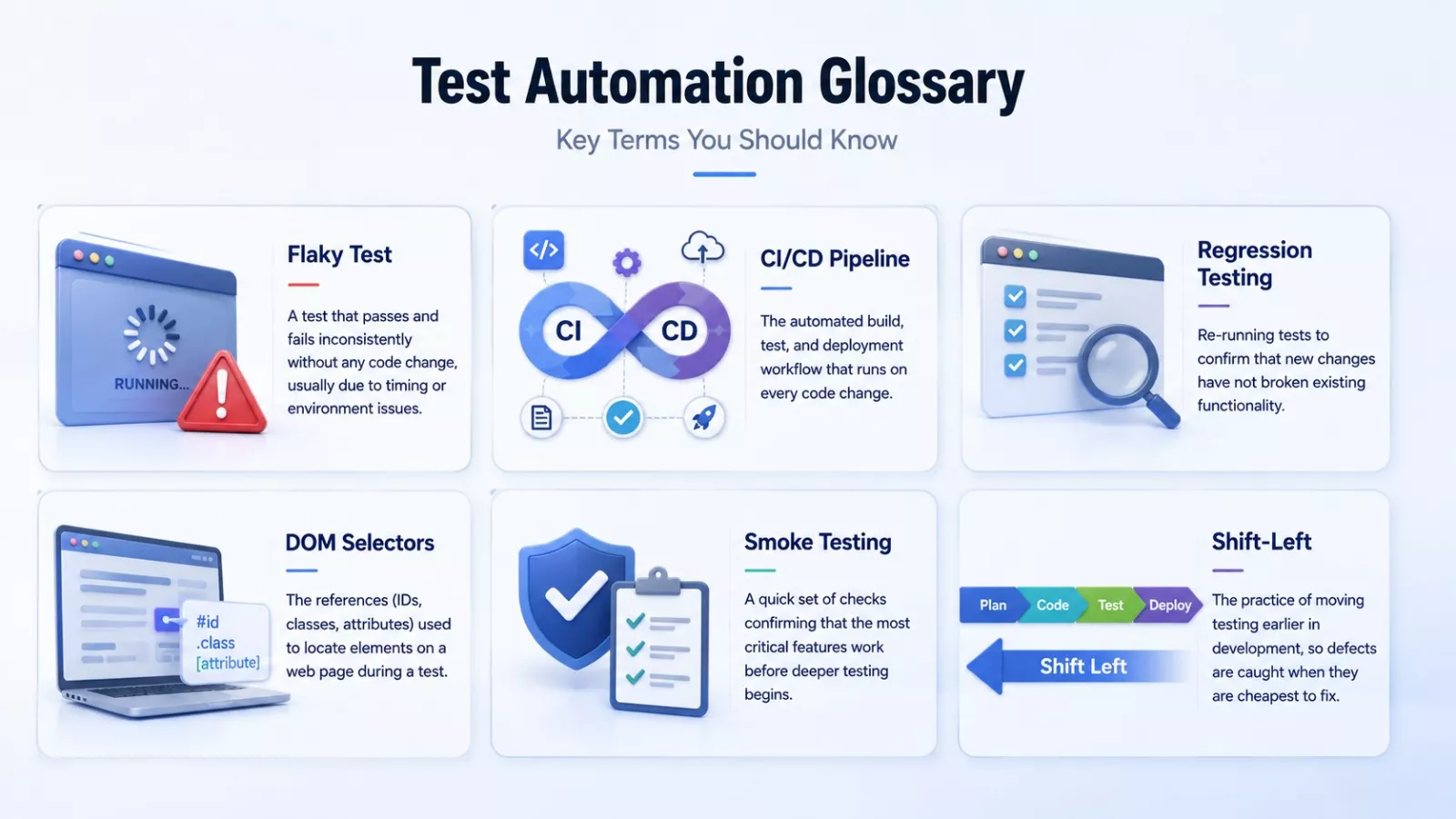
Flaky Test, a test that passes and fails inconsistently without any code change, usually due to timing or environment issues.
CI/CD Pipeline is the automated build, test, and deployment workflow that runs on every code change.
Regression Testing, re-running tests to confirm that new changes have not broken existing functionality.
DOM Selectors are the references (IDs, classes, attributes) used to locate elements on a web page during a test.
Smoke Testing is a quick set of checks confirming that the most critical features work before deeper testing begins.
Shift-Left, the practice of moving testing earlier in development, so defects are caught when they are cheapest to fix.
Is Your Team Ready for Test Automation? A Quick Checklist
- Your application has features stable enough to be worth automating.
- You have a CI/CD pipeline (or plan to build one) to run tests automatically.
- Your team agrees on which layer , unit, API, or UI to invest in first.
- You have a strategy for managing and isolating test data.
- Someone owns flaky-test triage, so trust in the suite does not erode.
AI Test Automation Solutions by Globussoft
 Modern software teams need testing solutions that are fast, reliable, and easy to scale. Globussoft.ai offers AI-powered test automation services that help businesses reduce manual testing efforts, improve software quality, and accelerate release cycles. By combining intelligent automation with modern testing frameworks, Globussoft enables organizations to build more efficient and reliable QA processes.
Features Offered by Globussoft
AI-Powered Test Automation: Automate repetitive testing tasks and improve test coverage with intelligent workflows.
Automated Test Case Generation: Create test scenarios faster using AI-driven insights and application analysis.
Self-Healing Automation: Reduce maintenance efforts with tests that automatically adapt to UI and application changes.
Cross-Browser & Cross-Platform Testing: Ensure consistent performance across different browsers, devices, and operating systems.
CI/CD Integration: Seamlessly integrate automated testing into development and deployment pipelines.
Performance & Regression Testing: Identify bugs, performance issues, and regressions before they reach production.
Custom Test Automation Solutions: Tailored automation strategies designed to meet the unique requirements of your business and applications.
With Globussoft’s AI-driven testing solutions, businesses can release software faster, improve product quality, and reduce the time spent on manual quality assurance activities.
Conclusion: Building a Test Automation Suite That Saves Time
Effective test automation is not about automating everything in sight. It is about a well-balanced pyramid, a thin and stable UI layer, the leverage of modern AI test automation tools, and the discipline to keep tests reliable. Start small: automate the stable middle layer, your API, and integration tests, where the return on investment is highest, then expand outward as confidence grows. Done right, your suite stops being a chore and starts being the thing that lets you ship faster, with fewer surprises.
Frequently Asked Questions
What is test automation in simple terms?
It uses software tools to run tests automatically and compare the results against what you expected, instead of checking everything by hand.
Is automated testing better than manual testing?
Neither is universally better. Automated testing wins for repetitive, high-frequency checks; manual testing wins for exploratory, usability, and subjective evaluation.
What are the best AI test automation tools?
Popular options include mabl and Tricentis Testim for low-code AI automation, alongside self-healing capabilities now built into many modern frameworks.
Can test automation fully replace manual testers?
No. It removes repetitive work so testers can focus on exploratory testing, UX, and strategy that machines cannot judge.
Where do I start with test automation?
Begin with stable, high-value API and integration tests, run inside a CI/CD pipeline, before expanding into UI tests.