
You have installed OpenClaw in your system. Now, you are thinking, would it expose my data to others?
OpenClaw security becomes a real concern the moment your AI agent starts acting on your behalf. What looks like a simple setup can quietly open access to your system if left unchecked.
Reports have shown that many OpenClaw instances were unintentionally exposed to the public internet. At the same time, a growing number of unsafe or misleading skills have appeared in public repositories. In one scenario, a user only needed to visit a webpage for an attacker to gain control, which highlights why OpenClaw security deserves closer attention.
That’s usually when things click. The tool works exactly as promised. It automates tasks, connects apps, and saves time. But then a different question shows up.
What did I just allow this system to access?
That question matters more than most people expect. The same features that make the agent powerful also increase risk when the setup is too open. This guide walks through what actually matters, without overcomplicating it, so you can use the system with confidence.
Read Aloud!
Quick answer: Is OpenClaw secure?
OpenClaw security depends on how you configure it. The default setup can expose your system to your network, but a few focused changes remove most real risks without limiting what the agent can do.
What Is Openclaw, And Why Does Its Security Matter?
How OpenClaw works: the gateway model explained
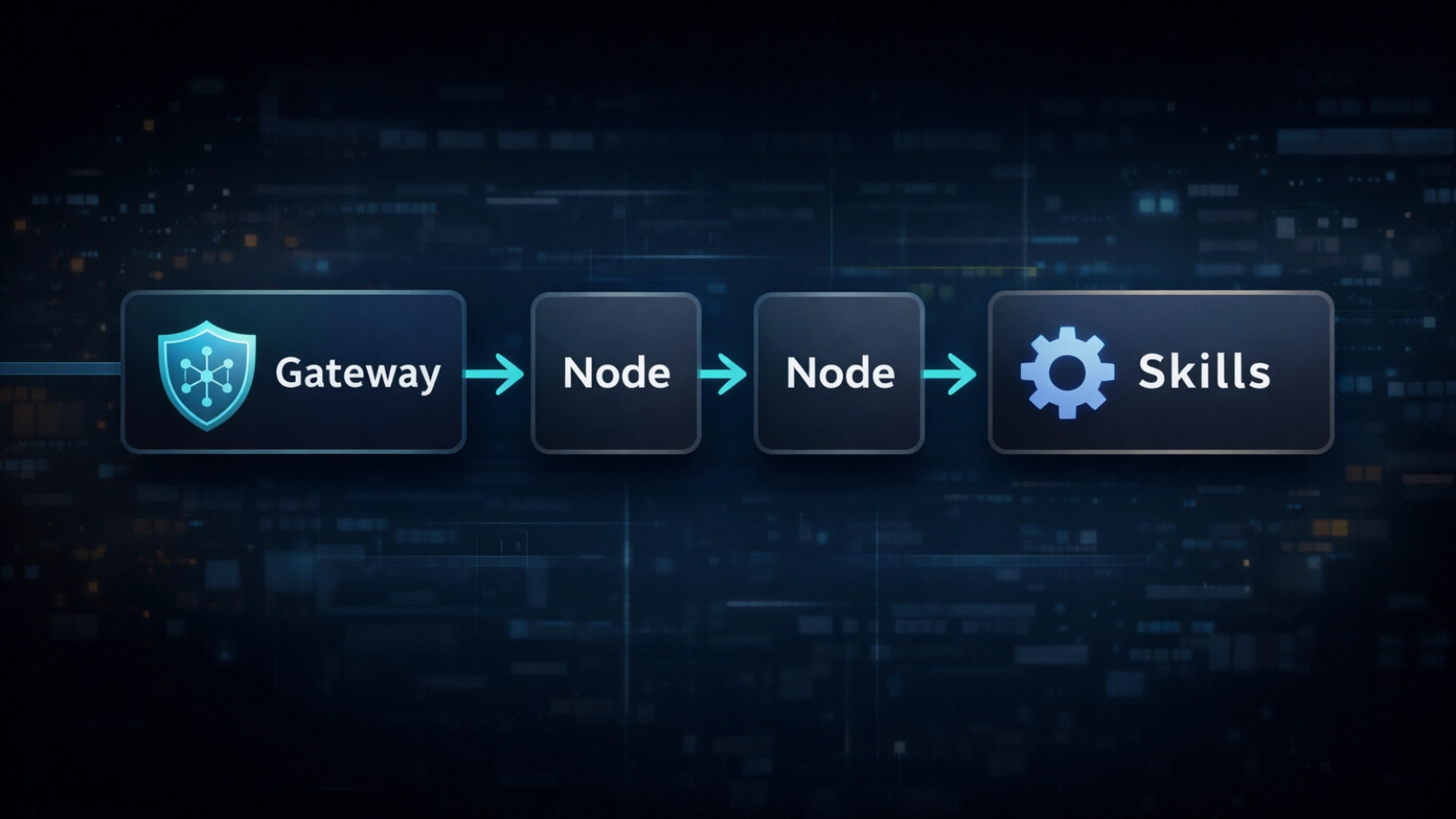
OpenClaw is a self-hosted AI agent that connects to platforms like WhatsApp, Telegram, Slack, and Discord. It doesn’t just respond to messages. It can take action across systems.
You can send emails, execute commands, read files, or trigger workflows automatically. That level of control is what makes it appealing, but it also brings OpenClaw security into focus.
At the center is the OpenClaw Gateway, which handles instructions. Nodes carry out actions, while Skills extend capabilities. These parts work together as a chain. If one link is exposed, the rest becomes vulnerable.
Why Self-Hosted Agents Carry Different Risks Than Cloud AI
Most cloud-based AI tools operate inside managed environments. You don’t see the infrastructure, but it’s tightly controlled.
Here, things work differently. Since OpenClaw runs on your own system, it uses the same permissions and access levels as your machine, which makes OpenClaw security something you have to manage directly.
Installing a skill can be similar to installing software with system-level capabilities. That shift gives you flexibility, but it also means responsibility shifts to you as well.
The Three Real Risks You Should Understand

Risk 1: exposed gateway and default settings
By default, the system listens across all network interfaces. That sounds technical, but the impact is simple.
Your gateway may be visible to other devices on your network, and sometimes even outside it.
In several cases, systems were running without authentication. A reported vulnerability showed that a malicious webpage could connect silently and execute actions without any clear warning.
This is where many OpenClaw security issues begin. Defaults are designed for convenience, not safety.
Risk 2: unsafe skills and supply chain risk
Skills extend what your agent can do, but they also introduce risk.
Some skills look legitimate. They have documentation, examples, and even high usage numbers. That doesn’t always mean they are safe.
In one large incident, a number of skills included hidden instructions. Users were asked to run commands during setup, which installed harmful software.
The risk often isn’t obvious in the code itself. It’s hidden in setup steps that seem routine at first glance.
Risk 3: prompt injection and delayed impact
This risk behaves differently from traditional attacks.
Instead of breaking into your system directly, an attacker places instructions inside content your agent reads. That could be an email, a webpage, or even a message.
The system processes it as input. It doesn’t always know whether the instruction came from you or somewhere else, which makes OpenClaw security harder to manage in these cases.
If stored, those instructions can trigger later. This is called memory poisoning. Something injected today might execute days later, making it harder to trace and prevent.
How To Run OpenClaw Safely: A Practical Approach
You don’t need to lock everything down at once, but some steps should happen immediately if you want to run OpenClaw safely.
Track 1: the 5-minute safe minimum
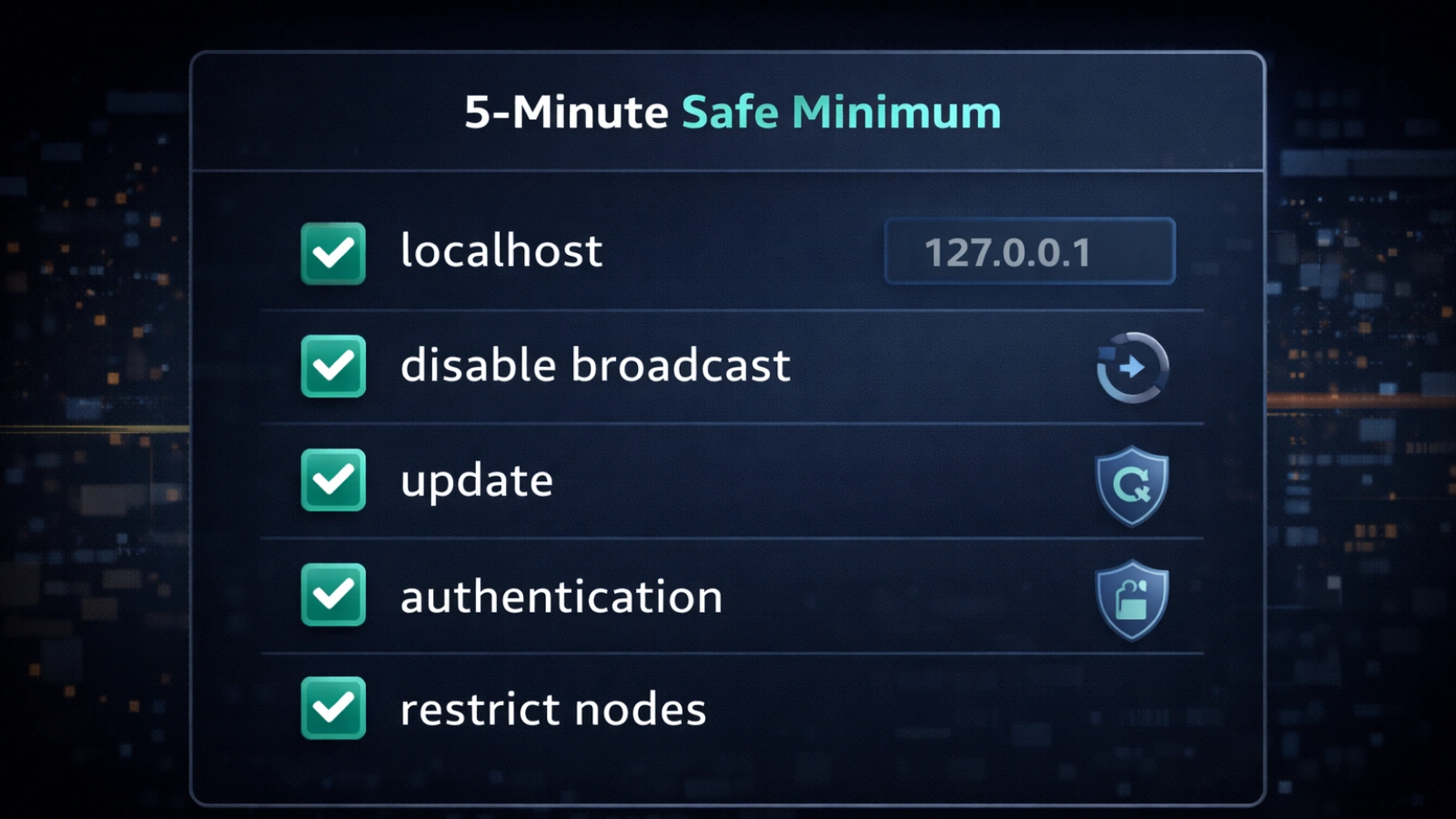
Start here before doing anything else.
Bind to local access only.
–host 127.0.0.1
- This keeps the system accessible only from your machine.
Disable network broadcasting
OPENCLAW_DISABLE_BONJOUR=1
- This prevents your setup from being discoverable on the network.
Update the system
openclaw update
- Updates fix known vulnerabilities and improve stability.
- Enable authentication
Add credentials so only authorized users can access the control panel. - Restrict unused nodes
Disable or limit devices you are not actively using.
These steps remove the most common exposure points quickly.
Track 2: deeper hardening for long-term use
Once the basics are covered, focus on isolation and control.
Run the system inside a container or virtual machine rather than your main environment. This limits damage if something goes wrong.
Avoid exposing ports publicly. Instead, use secure private networking tools. Use separate credentials for each integration. Reusing keys increases risk if one service is compromised.
For sensitive actions, add approval steps. It slows things slightly, but it prevents silent misuse.
Understanding the audit command
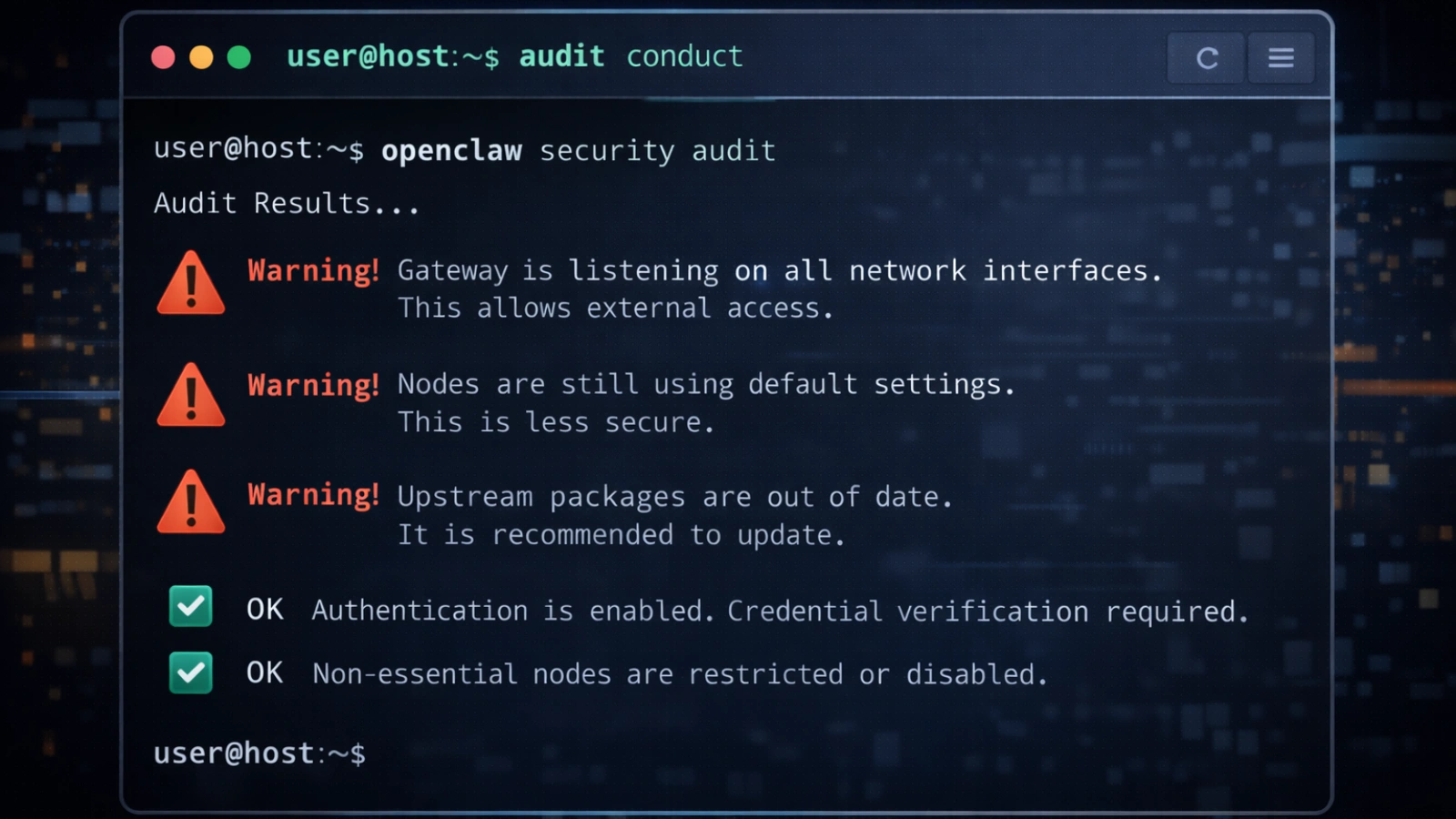
The built-in audit tool is one of the most useful features, yet many users skip it.
Start with:
OpenClaw security audit
This highlights common configuration issues.
For deeper checks:
OpenCLAW security audit –deep
To apply safe fixes automatically:
openclaw security audit –fix
For structured output:
openclaw security audit –json
Focus on critical flags first. These indicate immediate risks that need attention.
How to vet skills before installing them
Six practical red flags to watch
Before installing any skill, take a minute to review it, especially if you care about maintaining strong OpenClaw security.
Watch for scripts that run external commands without a clear explanation. Be cautious if the setup requires manual terminal input.
New publisher accounts with unusually high install numbers can also be suspicious. Encoded strings or unclear permission requests are another warning sign.
If there’s no public source code, it’s better to skip it. Small checks like these prevent larger problems later.
Recognizing social engineering patterns
Some of the most effective attacks rely on trust.
The documentation looks clean. The feature sounds useful. Then you see a line asking you to run a command to complete setup.
That step is often where the real risk lies.
Legitimate tools rarely require unexplained external commands. When they do, the purpose is clearly documented and easy to verify.
A simpler way to manage all of this

Setting everything up manually can feel like a lot, especially if you’re not used to working with configurations and audits, which is where OpenClaw security can start to feel overwhelming.
For users who prefer not to manage every detail, GlobusSoftAI simplifies the process.
It runs automated checks and presents results in plain language. Instead of open access to public skill libraries, it provides a curated and reviewed set of tools.
Safe defaults are applied during setup, including restricted access and authentication. It also monitors for suspicious instructions before they are executed.
Credentials are stored securely, and every action is logged. This makes it easier to track what the system is doing without building your own monitoring setup.
Also Read!
OpenClaw Browser: A Game Changer for Internet Users
OpenClaw VPS Guide: Everything You Need to Run an AI Agent
Common mistakes that create avoidable risk
Most issues don’t come from advanced attacks. They come from simple assumptions, especially when OpenClaw security is not considered during setup.
A home network is not automatically secure. Other devices on the same network can still connect.
High install numbers don’t guarantee safety. Some unsafe tools have gained popularity before being flagged.
Prompt injection is already being used in real scenarios. It’s part of a larger AI agent security crisis that is still evolving.
Fixing one issue doesn’t secure everything. New risks appear over time, so regular checks are essential.
The bigger picture: what these risks reveal

Why AI agents are structurally vulnerable
There’s a pattern that explains why these systems are harder to secure.
They have access to private data, they process external content, and they can communicate outward.
When all three are present, a single successful attack can spread quickly and persist.
This is why openclaw vulnerabilities are not just isolated problems. They reflect a broader shift in how systems operate, making OpenClaw security an ongoing concern rather than a one-time fix.
What security is moving toward
The challenge is no longer just fixing individual issues. It’s about designing systems that are secure by default.
AI agents now act as independent identities with access to real accounts and data.
Security models are evolving to handle this, focusing more on architecture and less on patching individual gaps.
Conclusion
OpenClaw security is powerful, and that power comes with responsibility. Most real problems come from simple configuration gaps, not complex attacks. A few deliberate steps can prevent the majority of issues.
Start with the basics. Run the audit, restrict access, and keep your system updated. Treat every skill as third-party code, because that’s what it is.
Once you understand how the system behaves and what it can access, you can use it with confidence instead of second-guessing every action.
Frequently asked questions
What is OpenClaw security?
OpenClaw security refers to the steps and configurations needed to protect your AI agent from unauthorized access and misuse.
What causes OpenClaw security errors?
Misconfigurations, outdated versions, or insecure skill installations are the most common causes.
How do I run OpenClaw safely?
Run it on a local host, disable public exposure, and review all installed skills before use.
What are common OpenClaw vulnerabilities?
Common risks include exposed gateways, unsafe skills, and prompt injection attacks.
How do I check OpenClaw’s security status?
Use built-in audit tools or review your configuration settings regularly.